

http://www.amazon.com/gp/product/B008GOP79G?keywords=isoacoustics&qid=1453940727&ref_=sr_1_1&sr=8-1
Tech Specs
HD6 Home Music System w/ Bluetooth aptX-HD
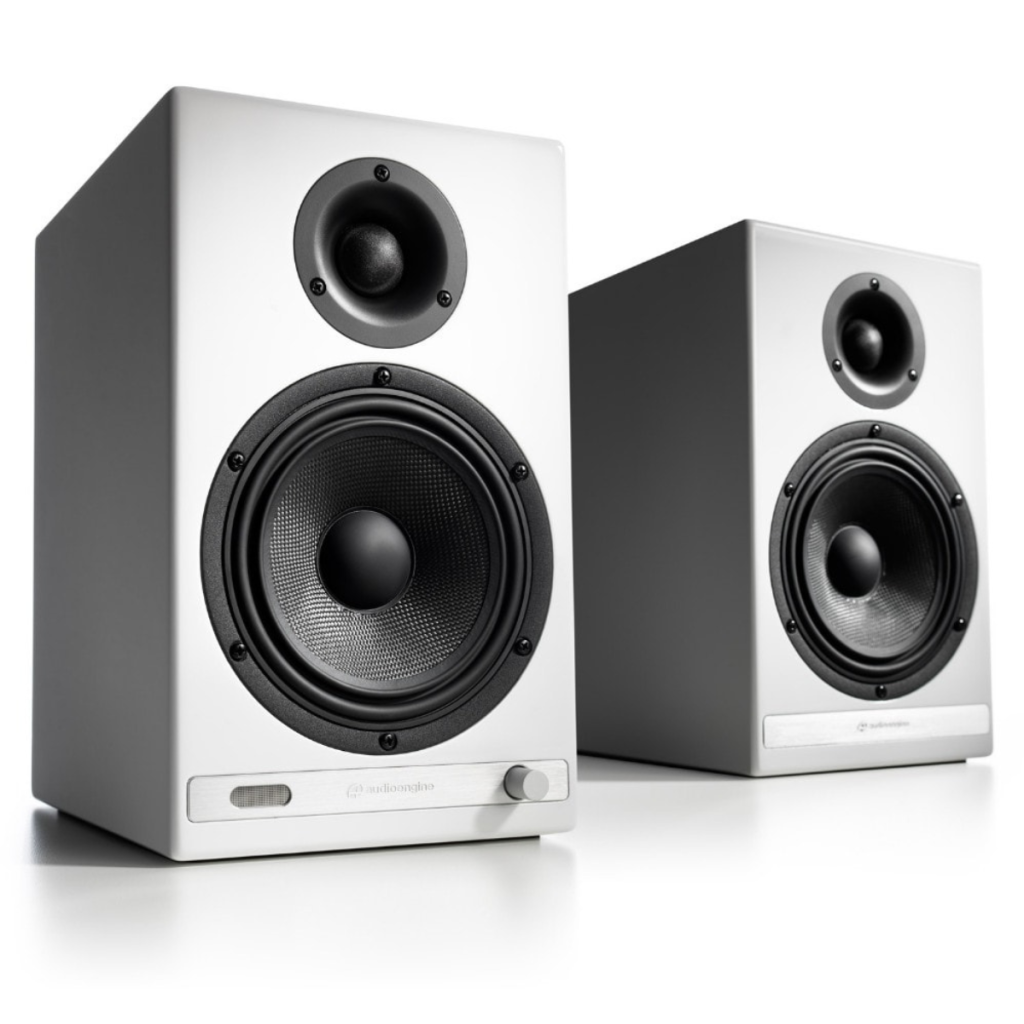
The crown jewel of the Audioengine line, the HD6 is a complete home music system with bold stereo sound that fills any room. It features wired and wireless connections, including digital optical from your TV, aptX-HD Bluetooth from your phone, tablet, or computer, or tried and true analog from your turntable or tape deck.
Pro Tip: Improve your home theater sound with the HD6 by using Bluetooth or optical input. This approach bypasses inferior audio components in your source device, enabling the HD6's built-in DAC to deliver superior audio quality.
—
/
—
Technical Specifications
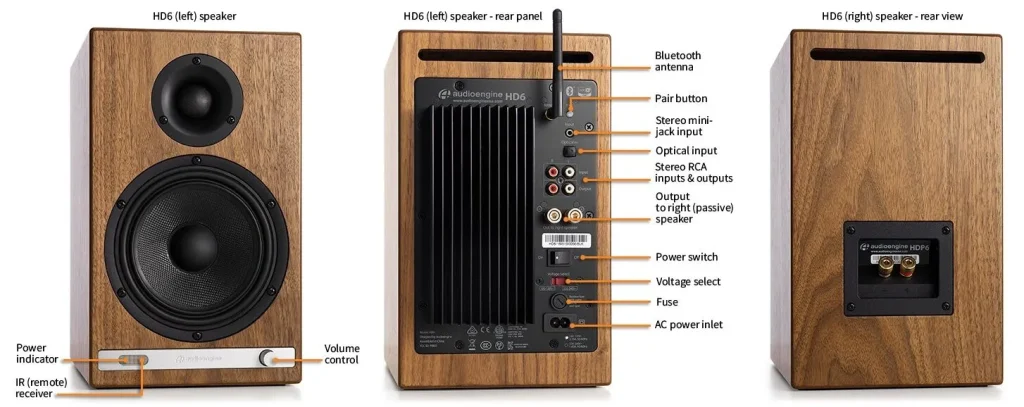
General Specifications
Type
Powered Bluetooth aptX HD speaker system
Amplifier Type
Class AB
Rated Power Output:
50W RMS per channel (measured in compliance with 16 C.F.R. § 432.3)
Peak Power Output: 75W per channel (AES)
Total Peak Power Output: 150W (AES)
Drivers
5.5″ aramid fiber woofers
1″ silk dome tweeters
Inputs
3.5 mm stereo mini-jack, RCA L/R, digital optical (SPDIF,) Bluetooth aptX
Outputs
RCA variable line-out
Input Voltages
115/240 V, 50/60 Hz manually switchable
SNR
>95 dB (typical A-weighted)
THD+N
Less than 0.05% at all power settings
Crosstalk
<50 dB
Frequency Response
50 Hz-22 kHz ±1.5 dB
Frequency Response w/ Bass Reduction Switch selected
N/A
Analog Input Impedance
48K ohms unbalanced (mini-jack and RCA inputs)
Nominal Impedance
N/A
Input Impedance
N/A
Crossover Frequency
N/A
Protection
Output current limiting, thermal over-temperature, power on/off transient protection, replaceable external main fuse
Power Consumption
Idle: 10 W
Mute: 6 W
Sleep: 4 W
Standby Consumption
N/A
Phase
N/A
Recommended Amplifier Power
N/A
Battery Life
N/A
Battery Charge Time
N/A
Bluetooth Specifications
Internal D/A Converter
PCM1793
Internal BT Receiver
N/A
Input Bit Depth
24 bit (padded)
Bluetooth Receiver Type
Bluetooth 5.0
Supported Codecs
aptX HD, aptX, AAC, SBC
Supported Bluetooth Profiles
N/A
Wireless Operation Range
Up to 100 ft (30 m) typical
Input Data Rate
Determined by Bluetooth
Wireless Latency
~30 milliseconds (ms)
Usb Specifications
Connector Type
N/A
USB Device Class
N/A
Input Bit Depth
N/A
Input Sample Rate
N/A
Headphone Amp Specifications
Headphone Amp Type
N/A
Full-scale Headphone Output Level
N/A
Output Impedance
N/A
Recommended Headphone Impedance Level
N/A
Optical Specifications
Internal D/A converter
PCM1793
Input Bit Depth
up to 24 bit native
Sample Rate
up to 192 kHz native
Weights And Measures
Dimensions (HWD)
Left speaker (active)
Dimensions: 11.75″ (30 cm) x 7.25″ (18.5 cm) x 10″ (25 cm)
Right speaker (passive)
Dimensions: 11.75″ (30 cm) x 7.25″ (18.5 cm) x 10″ (25 cm)
Weight
Left (active) – 17.5 lb (8 kg)
Right (passive) – 12.5 lb (5.5 kg)
Total Shipping Weight
33.5 lb (15 kg)
Shipping Box Dimensions (LWH)
20″ (51 cm) x 15″ (38 cm) x 17″ (43 cm)
Environmental Requirements
Operating temperature: 32 degrees F to 95 degrees F
Non-operating temperature: -4 degrees F to 113 degrees F
Relative humidity: 5% to 95% non-condensing
Materials And Construction
0.7″ (18 mm) thick MDF cabinets with real wood veneer
1″ (26 mm) silk dome tweeters with neodymium magnets
5.5″ (140 mm) aramid fiber woofers with advanced voice coils
Cabinets
To minimize unwanted resonances and distortion, Audioengine cabinets have thick high-resin MDF walls with extensive internal bracing. Heavy internal sound-damping material is used to reduce unwanted sound reflections inside the cabinet. All cabinet edges are rounded which look great and reduce high-frequency diffraction effects on the front baffles. The HD6 cabinet contains tuned, rear-port slots.
Furniture Grade Finishes
HD6 cabinets are available in several handsome finishes, including walnut and cherry veneers as well as satin black and high-gloss white paint, offering a myriad of options for complementing room furnishings. Also included are detachable grills that add further aesthetic advantages as they are firmly held in place with hidden neodymium magnets for a clean look.
Custom Components
Audioengine designs and manufactures our own tweeters, woofers, and other critical components. In other words, these are not “box built” speakers with off-the-shelf parts but custom-designed to our specifications. What we do not fabricate directly in our factory we have made to our designs (parts such as transformers, magnets, and wiring harnesses, for example). The cabinets, drivers, bass port designs, amplifiers, and crossovers are all painstakingly tuned together for each Audioengine model. This, in turn, makes for a much more efficient system that requires much less power than passive speakers and a separate integrated amplifier or similar A/V components.
Based On Studio Monitor Designs
Studio monitor speakers are used by producers and engineers in recording and production studios. They are designed with a theoretical flat frequency response which allows the engineer to create a final mix in such a way that the recorded music will sound good on most other speakers. Although Audioengine speakers are not designed to be up-close “nearfield” studio monitors, we do carry over much of the same higher-end technology, components, and design philosophy for all Audioengine speaker systems.
Efficient Integrated Design
The speaker cabinets, drivers, innovative bass port designs, amplifiers, and passive crossovers are all critically tuned together for each Audioengine model. This, in turn, makes for a much more efficient system that requires less power than passive speakers and a separate integrated amplifier or similar A/V components. We build all this goodness into the left speaker cabinet to make it super-easy to connect your smartphone, tablet, computer, TV, network player or any other audio product.
High-quality Bluetooth Audio
The Bluetooth built into the HD6 powered speakers features aptX HD coding which is an advanced Bluetooth audio codec with very impressive sound. And even if your phone or tablet does not have aptX HD, the HD6 Bluetooth solution is backwards-compatible with SBC and AAC codecs, as well as standard aptX, so you can wirelessly stream music from any Bluetooth-enabled device and still enjoy all your music. High-fidelity Bluetooth aptX HD that really works and sounds great. Here is why:
Extended-range wireless.
Most Bluetooth implementations have very limited range, typically within just one room. But with careful signal management circuitry and antenna tuning, we offer a superior solution that has up to 3 times the range of standard Bluetooth for multi-room use, with no degradation in audio quality.
Most Bluetooth implementations have very limited range, typically within just one room. But with careful signal management circuitry and antenna tuning, we offer a superior solution that has up to 3 times the range of standard Bluetooth for multi-room use, with no degradation in audio quality.
The HD6 features the Texas Instruments PCM1793, a high-performance 24-bit DAC designed for precise digital-to-analog conversion with exceptionally low noise and distortion. Through the optical input, the PCM1793 supports native audio resolutions up to 24-bit/192 kHz, preserving the detail of high-resolution recordings.
For Bluetooth listening, incoming digital audio is processed through the same 24-bit DAC, delivering clean, accurate sound from wireless sources. The PCM1793 features an advanced segment architecture, an 8x oversampling digital filter, and an impressive 113 dB signal-to-noise ratio. Combined with the HD6’s carefully designed power supply and filtering circuitry, these technologies help minimize unwanted noise and distortion, ensuring excellent sound quality whether listening through Bluetooth or a wired optical connection.
Amplifier Design
The amplifiers in powered Audioengine speakers are located in the left speaker and are a conservatively-rated class A/B analog monoblock design. This is a more traditional speaker/amplifier marriage which provides excellent quality audio and greater flexibility. All circuit boards for the power and preamp sections are vertically mounted for maximum mechanical shock protection.
Driver Designs
Audioengine uses audiophile-quality, ferrofluid-cooled silk dome tweeters with neodymium magnets. Silk tweeters hold up well under high power and the edge-driven design gives very smooth response. The woofers are aramid fiber woven glass composite with rubber surrounds. Aramid fiber is obviously very strong, which means the woofer retains its shape when being driven at high levels. The HD6 woofers are housed in cast aluminum frames which provide high rigidity and increased heat dispersion.
Power Transformers
Power transformers are critical to to high-quality audio performance, especially in the low-end and again, no off-the-shelf parts. Audioengine uses gapless core toroidal transformers which have a tighter radiated magnetic field, translating to lower noise. They are lighter than standard, lower-cost transformers and also generate less heat.
Shielding
Both drivers are directly video shielded and allow the user to place the speakers within a few inches of a video monitor. This shielding also offers protection for hard-drive digital music players.
Quickstart Guide
HD6 Quick Setup
Step 1: Connect the speaker wire from the HD6 left (powered) speaker to the right (passive) speaker.
Step 2: Connect the wireless antenna to the HD6 rear panel.
Step 3: Connect the power cable to the HD6 rear panel and plug the other end into an AC power outlet.
Wireless Connection
Step 4: Turn on the HD6 power switch located on the rear panel. HD6 will automatically go into Bluetooth “pair mode” and the Pair button on the HD6 rear panel should start flashing.
Step 5: On your device (phone, tablet, laptop, etc), turn on Bluetooth and go to Bluetooth preferences.
Step 6: Select “Audioengine HD6” to pair and connect. The Pair indicator on the HD6 rear panel should be solid.
Play your music and adjust volume levels on HD6 and your device.
Step 7: To add additional devices put HD6 back into pair mode by disconnecting HD6 from your device or by pressing and holding the Pair button on the HD6 rear panel until the pair indicator starts flashing.
HD6 can wirelessly connect to only one device at a time, however it will remember up to six different devices.
Wired Connection
Step 8: Connect one of the included audio cables to your music player (phone, tablet, computer, TV, etc) and the other end to an input on the HD6 rear panel.
Step 9: Play your music and adjust the volume on the speakers and your device to the desired listening levels.

For the full setup guide, download the attached PDF
HD6 quickstart guide_V01-WEB
HD6 Setup Video
Troubleshooting
HD6 Troubleshooting Tips
The following troubleshooting tips can help diagnose and correct most concerns with the HD6. We have attempted to make this list as comprehensive as possible, so some of these may not apply to your issue, but please go through each tip.
If the power indicator on the HD6 front panel is not illuminated, then try these tips:
- Verify that the AC power cord is connected to the speaker rear panel and to a working AC power outlet.
- Check that the speaker’s power switch is in the ON position.
- Check that the rear panel voltage selector matches the operating voltage in your country or region.
- If there is still no power, check the fuse in the rear panel. If the fuse is blown and needs to be replaced it is important to replace with same fuse type and value.
If the front panel indicator light is on but you are experiencing an audio-related or other issue, try these tips:
- Power-cycle the speakers by switching them off and back on using the power switch on the rear panel.
- Be sure the speakers are not in MUTE or SLEEP mode (if so, the front panel indicator light will be flashing).
- Check that the cables from your audio sources to the speaker are properly connected. Confirm by unplugging the audio cables and then reconnecting. Try using as many different inputs and input sources as possible to see if the problem follows.
- Check speaker wire connections from the left (powered) speaker to the right (passive) speaker. Confirm by removing the speaker wire from on each speaker and reconnecting. Also check speaker wire polarity by verifying that the wires are going to same terminals on both speakers.
- Verify that your audio input source components or devices are all powered on and the volume levels are turned up.
- If using a computer, verify that the audio output balance setting is centered for the OS and all apps.
- Make sure the speakers are not too close to a wall or other obstruction, which could limit bass output.
- Decrease the volume level of the audio input source and increase the volume of the speakers.
- If you are using a wireless adapter, preamp, or external DAC with these speakers, remove these (temporarily) and connect the audio source directly to the speakers.
- If your input source has its own EQ or other sound settings, make sure they are all (temporarily) turned off.
- Also try moving the speakers to a different location to see if something is causing interference in the current location. Something as simple as a wireless internet router, cordless or mobile phone, or halogen lamp near the speakers can all cause interference.
HD6 troubleshooting tips – Bluetooth
- Verify that the HD6 is connected to power and the rear panel power switch is turned on. If you haven’t already, power-cycle your speakers by switching them off and back on.
- If your HD6 is already connected to a device via Bluetooth, the Bluetooth Pair light on the rear panel of the left speaker will be on and solid (note that if your HD6 has been idle and not connected to a device for more than 2 minutes, the Pair light will automatically turn off). Tap the Pair button and it should begin blinking (or pair to your HD6 using your source device, and the LED will go from off to on and solid).
- Try playing audio from more than one application on your phone/tablet, or computer.
- Check to make sure your source device (computer, tablet, phone, etc) is running the most up-to-date version of software available. For Mac OS users, be sure to check the App store to see if there’s a newer version of Mac OS you could be running.
- Try disconnecting from and forgetting the HD6 through your device’s Bluetooth settings, and re-pairing to the HD6.
- Try using a different source device with your HD6 to see if the issue follows. Also be sure to test your HD6 using the analog input as well.
- If possible, try your HD6 in a different location to see if something is causing an issue in the current setup. Something as simple as a wireless internet router, cordless or mobile phone, or halogen lamp near the speakers may be causing interference in your setup.
HD6 troubleshooting tips – remote control
Remote control is not working or remote range is reduced.
- Make sure nothing is blocking the remote control receiver, which is in the left powered speaker.
- Check the remote battery to be sure it is installed correctly.
- Replace the battery with another CR2025 battery
FAQ's
Yes! We incorporate all the relevant functions and features from Bluetooth 5.0 that apply to our products! These features include; extended range, low latency (so that video and audio sync properly), as well as higher level aptX-HD, aptX, and AAC codecs (with the exception of our 512 portable speaker which supports SBC only). Keep in mind that the capability of the source is what controls the Bluetooth experience.
Absolutely! To do so:
- Open the Alexa App on your smartphone or tablet (Apple link | Google Play Link)
- Tap the “Devices” icon and select the Echo/Alexa device you want to connect to speakers
- Select “Bluetooth Devices”
- Select “Pair New Device”
- Find your Audioengine wireless speaker on the list of available Bluetooth devices, and select it
Absolutely! You can connect any Audioengine speaker with an analog output to any Sonos product that has the Line-In feature. You can also connect any Audioengine passive speakers into an existing Sonos system using the Sonos Amp.
Yes they do! They are equipped with a power-saving circuit that turns off the speaker’s final stage amp. This idle mode activates right after you stop playing music. Due to this power-saving function, it’s perfectly fine for the speakers to stay on all the time!
No extra software or drivers are needed. The HD6 is compatible with any device that supports Bluetooth, and the A2DP profile for streaming stereo audio. This includes most smartphones, tablets, and computers.
Each Speaker is 11.25″H x 7″W x 10.5″D
1. Turn Off and Unplug:
- Make sure your system is turned off and unplugged.
2. Dust the Surfaces:
- Use a soft, dry cloth to wipe away dust.
- For hard-to-reach places, use a soft brush or a can of compressed air.
3. Wipe Down the Exterior:
- We do not recommend using any solvents
- If cleaning off stains or build-up is necessary, we recommend doing so with a very small amount of mild cleaning solution applied only to the affected area, followed by quickly wiping the area dry completely.
- Any scoured pads or objects like a ‘magic eraser’ too easily run the risk of removing sealers and top coats of the painted finish that can leave a clearly visible change in the uniformity of the paint/finish
4. Clean the Speaker Grills:
- The speaker grills can be gently cleaned with a vacuum, preferably using a soft bush attachment.
- A lint roller can also be used.
5. Clean Buttons and Knobs:
- A dry cloth is recommend for cleaning any knobs, buttons or other surfaces
- Be careful not to let water get into any gaps.
6. Clean Ports and Connections:
- Use compressed air to blow out dust from ports and connections.
7. Let Everything Dry:
- Make sure everything is completely dry before plugging back in and turning on.
8. Regular Cleaning:
- Dust your system regularly to keep it in good shape.
By following these steps, you can keep your Audioengine system clean and working well.
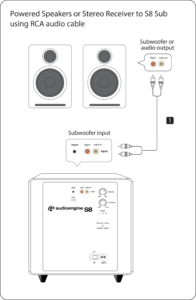
For starters, you will need to use a powered subwoofer with analog inputs (either RCA or 3.5mm). Simply connect the subwoofer to the RCA outputs found on the back of the HD6 speakers. If your subwoofer only has a 3.5mm input, you could pick up a 3.5mm to 2-Male RCA Adapter cable to bridge the connection between your subwoofer and the HD6 speakers.
Please refer to the image below, using our S8 as a reference:
Yes! We’ve been notified that the Android App ZappIR supports the A5+s, so if you have a phone with an IR blaster like the HTC One or the Samsung Galaxy S4 you can use the App to raise or lower the volume of your A5+s or HD6s with your phone!
All Optical audio is considered a “fixed” output, meaning volume will not attenuate from the TV remote. If you have an HD5/HD6 you can use the Audioengine remote for this. Fo
Once your HD6 is paired and connected, then open any app (iTunes, Spotify, Amarra, etc.) – or online players such as Youtube – and it will automatically play your music through Bluetooth once you’ve selected what you want to hear.
All turntables require a phono preamp stage before connecting to Audioengine speakers. Many turntables have this built-in , while others do not and would require an external phono preamp. Check the turntable manufacturer’s website or user manual. Some turntables may even include Bluetooth, in which case you can pair and connect them to the speakers wirelessly!
Even though the HD6 has a built-in Bluetooth receiver, the HD6 are extremely versatile and can be used with a number of different devices, both digital and analog. There two analog inputs, a mini-stereo and RCA input, on the rear panel so you can directly connect any product with a line-level/preamp audio output, such as a turntable. The HD6s also have an optical input that utilizes the speakers’ built-in DAC, so any source that has a digital optical output can be used directly with the speakers, such as the optical output of your television or computer.
It’s pretty easy! Our powered speakers are an all-in-one solution with no extra amps or components needed! All you need to do is unpack the speakers, place them where you want, and then plug in the AC cord. Next, connect the powered speaker to the right passive speaker using the included upgraded speaker wire with banana plug tips. Finally, plug in your music (cell phone, turntable, computer, laptop, etc.) with the supplied cables or via Bluetooth and you’re ready to go!
Here is a quick video that can be used as a reference.
(Please note – there is no audio associated with the video.)
Audioengine speakers can be easily connected to your TV set as long as there are analog outputs available. Any of our speakers will provide a greatly enhanced TV audio experience with a wider soundstage and better imaging than most sound bars.
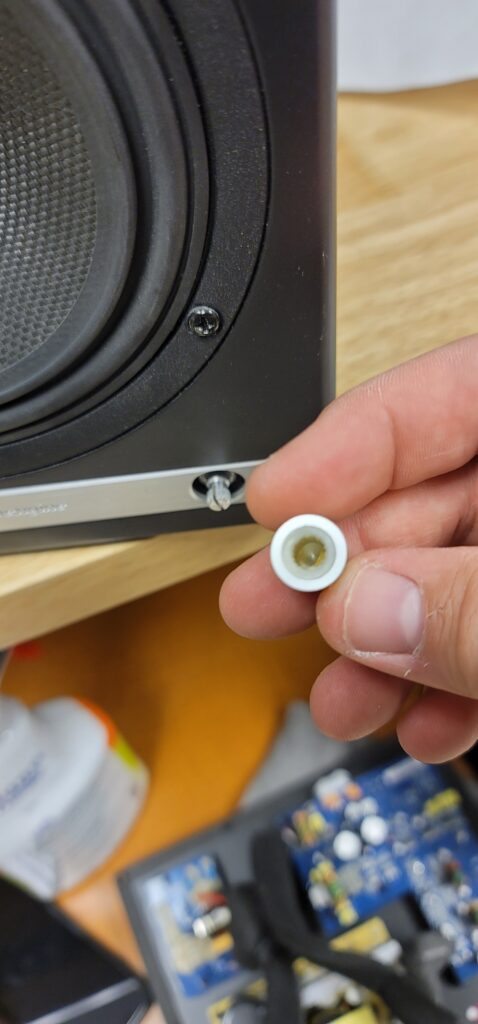
– The process for replacing a volume encoder begins with pulling the volume knob straight back from the encoder shaft
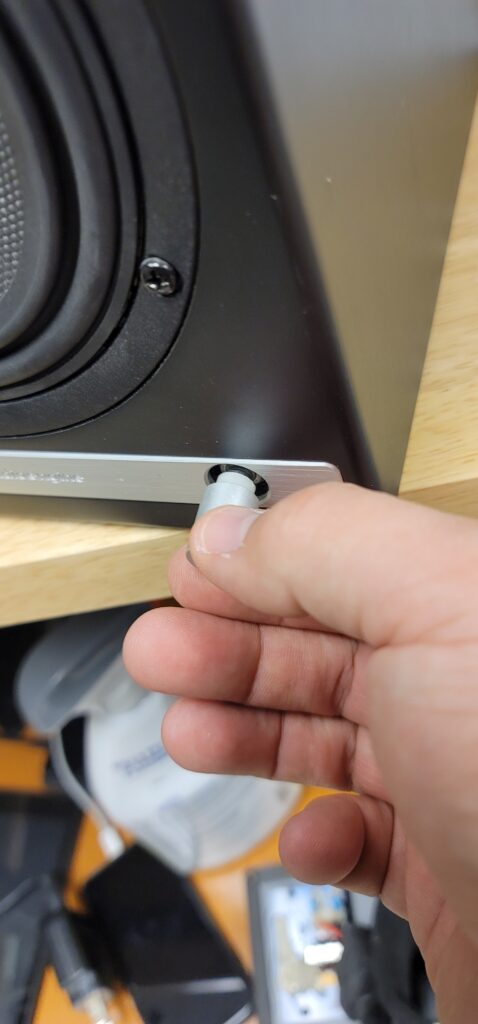
– Make sure the rubber insert stays with the volume knob –
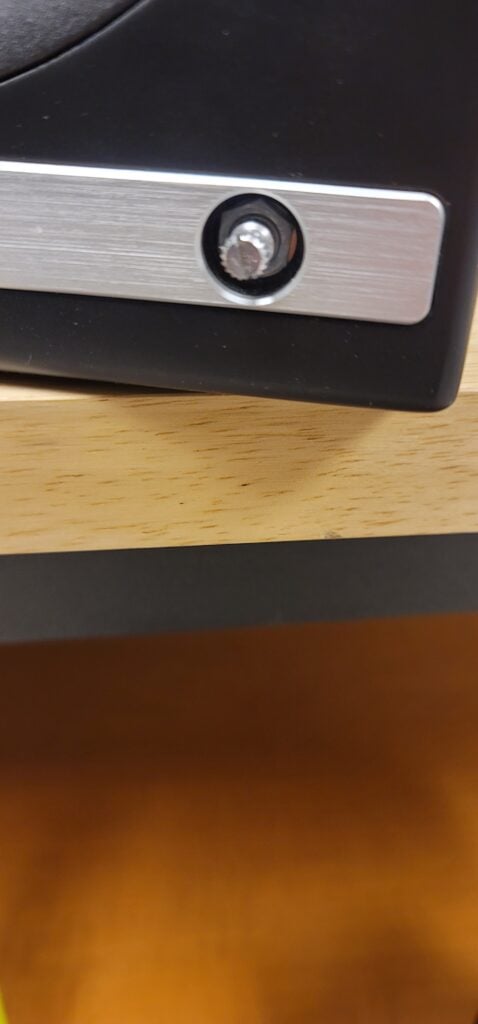
– The volume encoder shaft should look like so before proceeding –
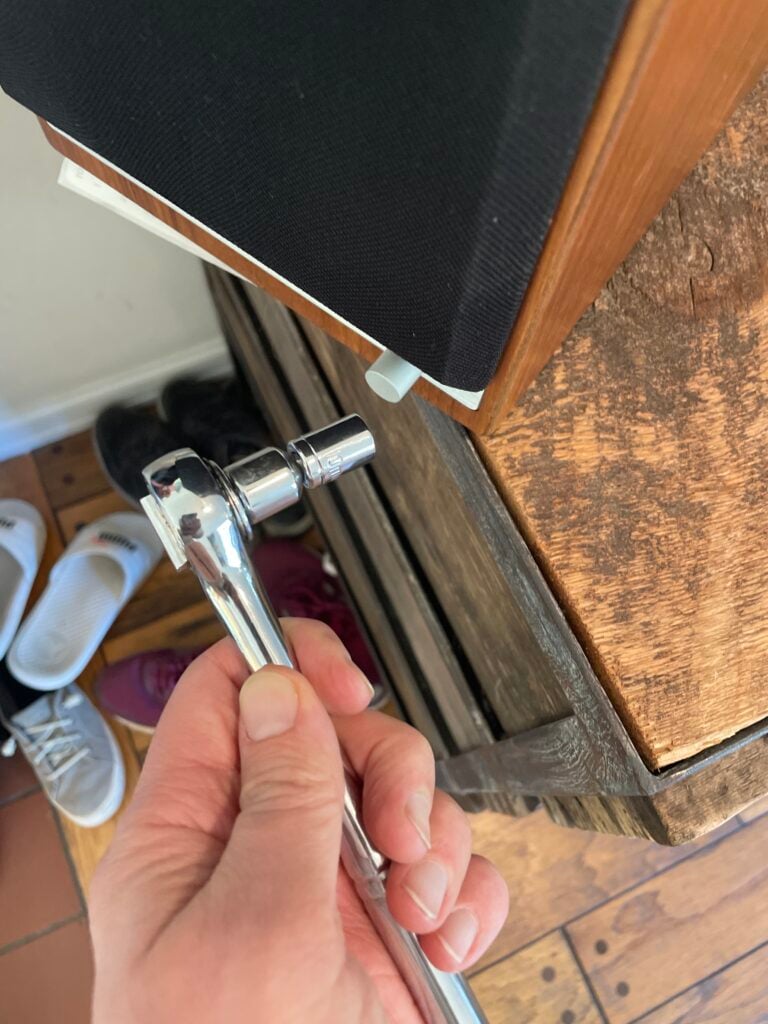
– Using a thin-walled 10mm socket, remove the lock nut fastening the encoder to the front of the speaker cabinet –
– Once you have removed the amp backplate on the back of the active speaker, make sure to remove the encoder wiring terminal clip from the amp circuit board. You can then fully uninstall the encoder assembly by pulling back the encoder shaft from the inside –
– Finally, the IR receiver can be removed by using a long-necked Phillips PH1 screw driver to remove the 2 screws fastening the IR receiver on the inside of the cabinet –
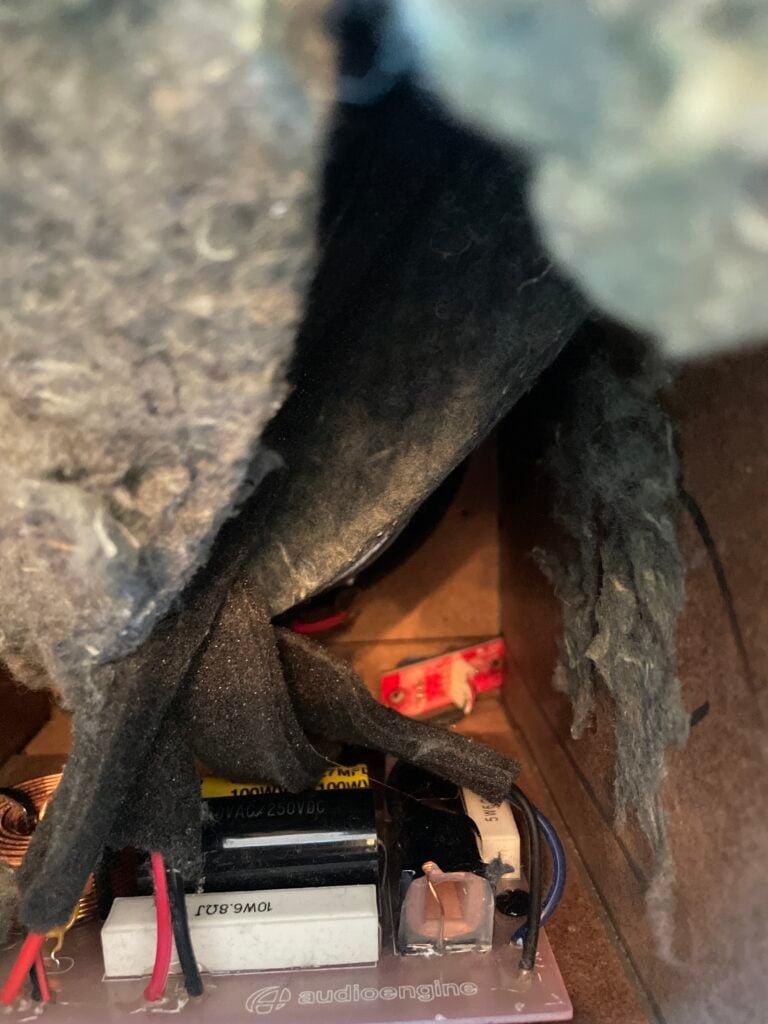
After fully removing the faulty encoder, the replacement can be installed following these steps in reverse order before finally connecting the wiring clip to the amp circuit board and fastening the amp backplate back onto the active speaker.
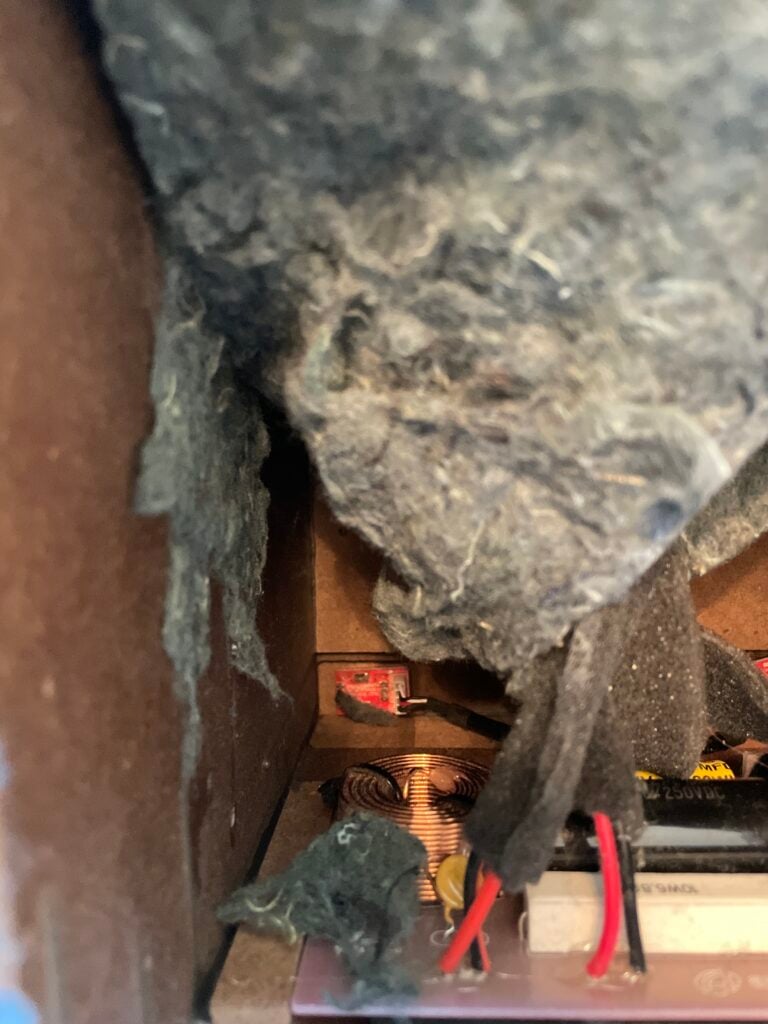
The process can be a bit cramped if you wish to do as little disassembly as possible, or a bit easier if you are comfortable moving parts to give yourself more workspace. The sound damping insulation normally overlaps at the bottom of the active cabinet. This can be peeled back similar to the reference picture attached. The crossover is mounted underneath this insulation (If process being done on an HD6) and is perhaps the most obtrusive part when replacing a volume encoder. This has two Philips head screws mounting it to the base of the cabinet along with an adhesive pad to reduce noise vibration. It is possible to remove the two screws and lift the adhered crossover up from the base of the cabinet momentarily to get better access to the IR receiver and volume knob assemblies at the front. If you’d rather not risk damaging anything, the IR receiver can still be unscrewed from the inside of the cabinet with a long-necked Phillips PH1 driver. The volume knob is loosened from the outside of the cabinet with a thin-walled 10mm socket found by pulling the volume knob straight back from the encoder shaft. Ample lighting will also make this work easier
You can absolutely still use the HD6 and it will sound great! AptX is a high-quality Bluetooth audio codec that works really well. In addition to mandatory support for SBC, Bluetooth also includes optional support for many other codecs, like MPEG-1, MPEG-2, MPEG-4, and AAC, all of which have their own advantages, and some of which sound very close to AptX.
The HD6 include some pretty significant upgrades over the A5+s. Among these are:
- Larger redesigned woofer with die-cast aluminum frame for extended bass response with fast dynamics
- New larger custom 1” tweeter for an open and realistic high end and an extraordinary soundstage
- Thicker, low-resonance cabinet
- Upgraded crossover components
In addition to the performance related upgrades, the HD6s also feature:
- Bluetooth aptX and digital optical inputs
- Real wood-veneer cabinet finish options
- Removable magnetic grills
- Solid aluminum remote control