

Support

1-855-845-5525 Get help from an expert

0
Tech Specs

S8 Powered Subwoofer

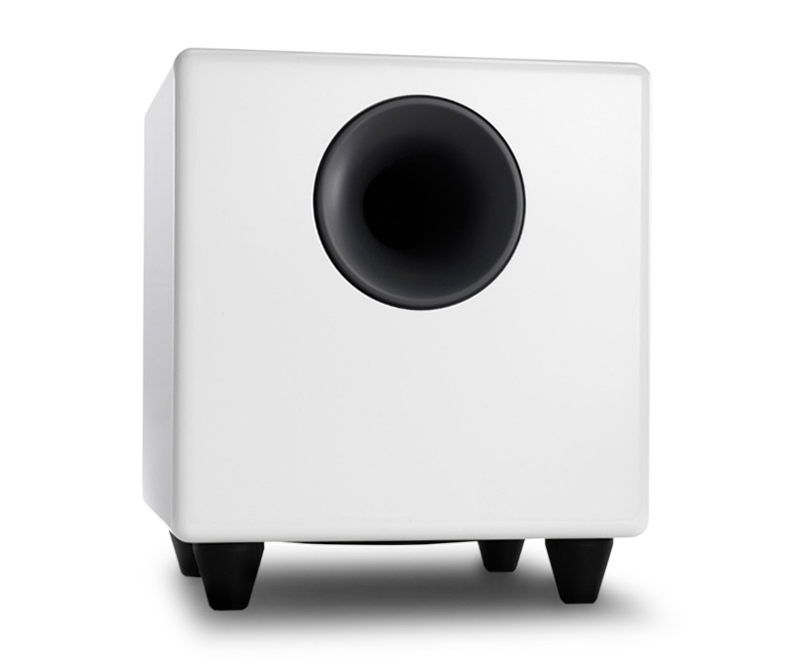
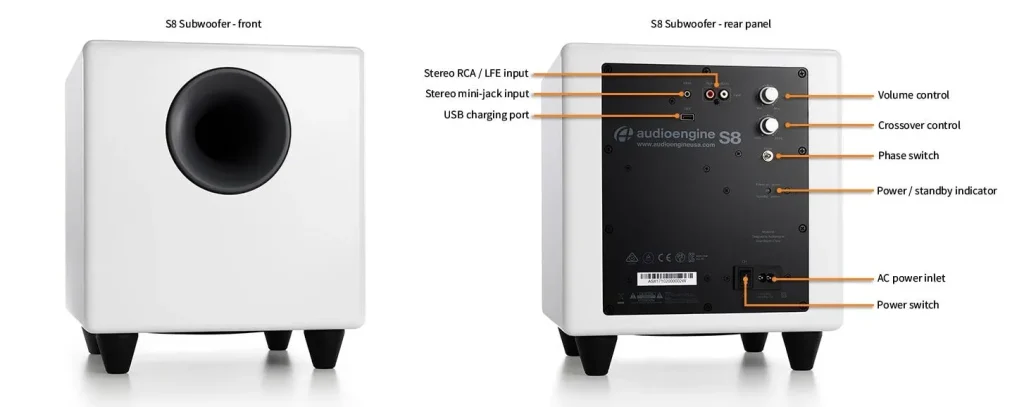
Fill out the sound of any audio system with the Audioengine S8 Powered Subwoofer. The S8 comes with our Isolation Elastomer Feet, which reduces vibration and resonance so you'll experience cleaner, tighter bass.

Pro Tip:

Place the S8 under your desk or against a wall in larger rooms. The S8's down-firing design provides deep bass, making it ideal for home theaters or living rooms. If you have close neighbors or need a compact option, consider the S6 for its desktop-friendly design.
Technical Specifications

S8_Tech

General Specifications

Type
Powered Subwoofer, front ported design

Amplifier Type
Class D

Rated Power Output:/strong>
140W RMS (measured in compliance with 16 C.F.R. § 432.3)
Total Peak Power Output: 250W (AES)

Drivers
8″ long throw down-firing woofer

Inputs
3.5 mm stereo mini-jack, RCA L/R

Outputs
N/A

Input Voltages
100-240 V AC, 50/60 Hz auto-switching

SNR
Greater than 95 dB (typical A-weighted)

THD+N
Less than 0.05% at all power settings

Crosstalk
N/A

Frequency Response
27Hz – 180Hz ±1.5 dB

Frequency Response w/ Bass Reduction Switch selected
N/A

Analog Input Impedance
N/A

Nominal Impedance
N/A

Input Impedance
10K ohms unbalanced

Crossover Frequency
50Hz – 130Hz

Protection
Output current limiting, thermal over-temperature, power on/off transient protection

Power Consumption
N/A

Standby Consumption
<1W

Phase
0 / 180 degrees

Recommended Amplifier Power
N/A

Battery Life
N/A

Battery Charge Time
N/A

Bluetooth Specifications

Internal D/A Converter
N/A

Internal BT Receiver
N/A

Input Bit Depth
N/A

Bluetooth Receiver Type
N/A

Supported Codecs
N/A

Supported Bluetooth Profiles
N/A

Wireless Operation Range
N/A

Input Data Rate
N/A

Wireless Latency
N/A

Usb Specifications

Connector Type
N/A

USB Device Class
N/A

Input Bit Depth
N/A

Input Sample Rate
N/A

Headphone Amp Specifications

Headphone Amp Type
N/A

Full-scale Headphone Output Level
N/A

Output Impedance
N/A

Recommended Headphone Impedance Level
N/A

Optical Specifications

Internal D/A converter
N/A

Input Bit Depth
N/A

Sample Rate
N/A

Weights And Measures

Dimensions (HWD)
11.25″ (28.6 cm) x 11.25″ (28.6 cm) x 11.25″ (28.6 cm)

Weight
23.6 lb (10.7 kg)

Total Shipping Weight
30 lb (13.6 kg)

Shipping Box Dimensions (LWH)
16″ (40.6 cm) x 16″ (40.6 cm) x 18″ (45.7 cm)

Environmental Requirements

Operating temperature: 32 degrees F to 95 degrees F
Non-operating temperature: -4 degrees F to 113 degrees F
Relative humidity: 5% to 95% non-condensing

Materials And Construction

15.6mm thick MDF cabinet
8″ custom downfiring woofer

Custom Components

Audioengine designs and manufactures our own tweeters, woofers, and other critical components. In other words, these are not “box built” speakers with off-the-shelf parts but custom-designed to our specifications. What we do not fabricate directly in our factory we have made to our designs (parts such as transformers, magnets, and wiring harnesses, for example). The cabinets, drivers, bass port designs, amplifiers, and crossovers are all painstakingly tuned together for each Audioengine model. This, in turn, makes for a much more efficient system that requires much less power than passive speakers and a separate integrated amplifier or similar A/V components.

Quickstart Guide

S8 Quick Setup

Here are two of the most common connection options to connect the S8 subwoofer to your music system, stereo receiver, or powered speakers.

Music System to S8 Sub using mini-jack audio cable

1) Connect a 3.5mm mini-jack audio cable from an output of your stereo receiver, powered speakers, or any music system with an output, to the S8 subwoofer input.
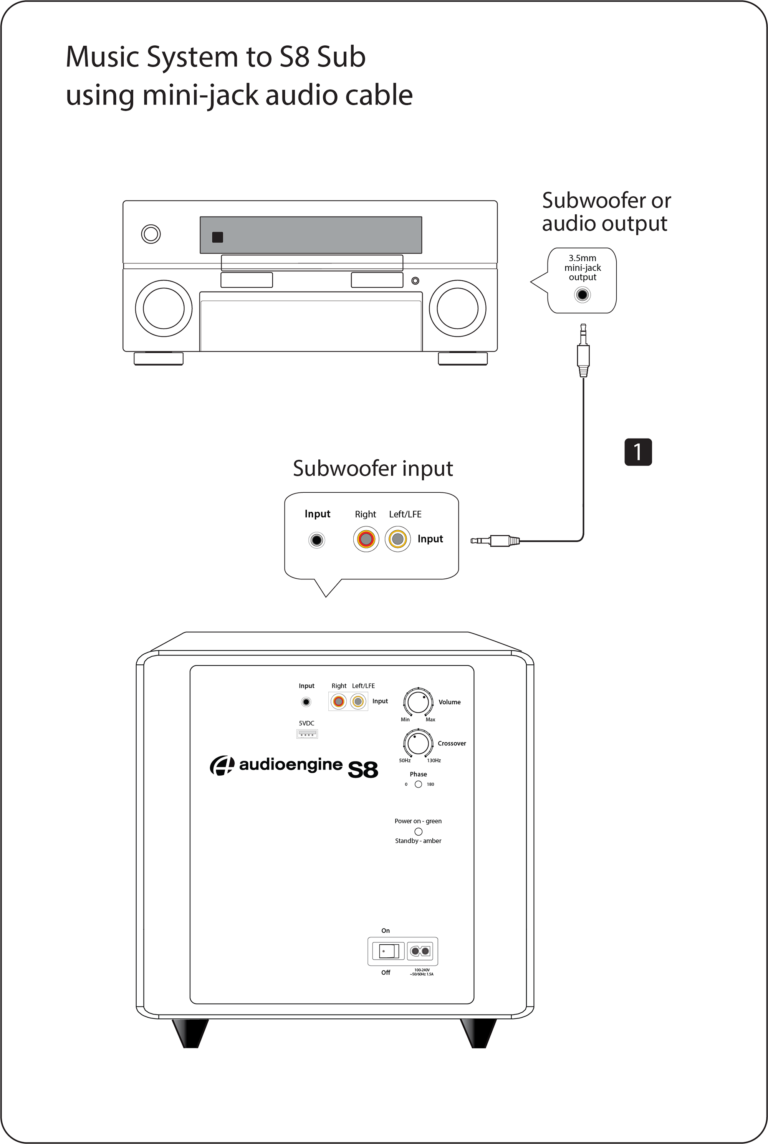
Note: Your receiver’s manual should indicate which subwoofer connection is most appropriate.

Powered Speakers or Stereo Receiver to S8 Sub using RCA audio cable

1) Connect an RCA stereo cable from an output of your stereo receiver, powered speakers, or any music system with an output, to the S8 subwoofer input.
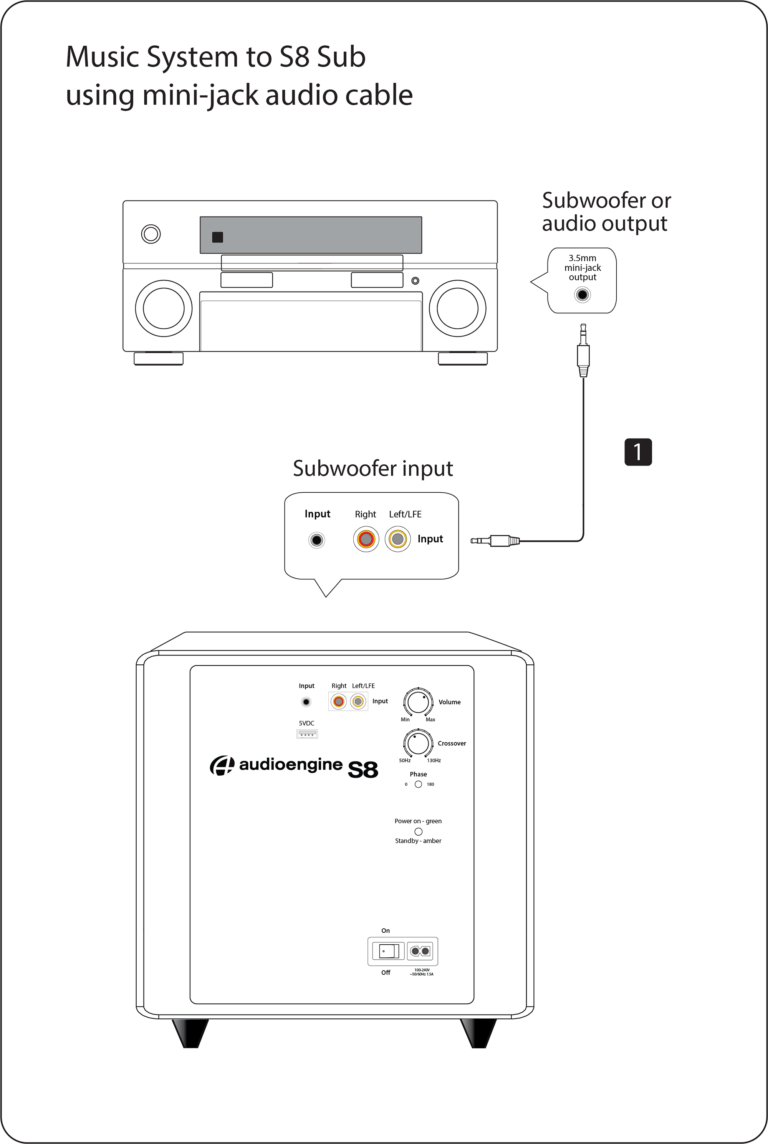
Note: If your stereo receiver or music system has a single RCA sub out or LFE output, connect an RCA cable from this output to the S8 sub RCA left (L) input.


For the full setup guide, download the attached PDF:
S8 Quick Start Guide


S8 Setup Video

Troubleshooting

S8 Troubleshooting Tips

The following troubleshooting tips can help diagnose and correct most concerns with the S8. We have attempted to make this list as comprehensive as possible, so some of these may not apply to your issue, but please go through each tip.

For trouble getting the S8 to “wake up” from standby mode, try turning the volume up on your source or speakers until you hear the S8 kick in. There is a minimum volume threshold to meet before the S8 will play.

If the power indicator on the S8 rear panel is not illuminated, try these tips:

  1. Verify that the AC power cord is connected to the S8 rear panel and to a working AC power outlet.
  2. Check that the power switch on the S8 rear panel is in the ON position and the volume control is not turned all the way down.
  3. Confirm that the rear panel voltage selector matches the operating voltage in your country or region.
  4. If the power indicator on the rear panel still does not illuminate, check the fuse in the rear panel.  If the fuse is blown and needs to be replaced it is important to replace with same fuse type and value.

If the S8 is powered on but you are experiencing an audio-related issue, try these tips:

  1. Check that the cables from your music source to the S8 are properly connected by unplugging the cables and then reconnecting.  Try using the mini-jack (Input B) as well as the RCA connectors (Input A) to see how the sub reacts.
  2. Check that the volume knob on the rear panel is not set to minimum volume.
  3. Verify that the volume levels of your audio source components, computer, etc are not set to minimum volume or powered off.
  4. If you are using any wireless adapters or other products with your sub, please remove the wireless device (temporarily) and connect the source directly to the sub.

FAQ's

Select the fields to be shown. Others will be hidden. Drag and drop to rearrange the order.
  • Image
  • SKU
  • Rating
  • Price
  • Stock
  • Availability
  • Add to cart
  • Description
  • Content
  • Weight
  • Dimensions
  • Additional information
Click outside to hide the comparison bar
Compare