

Support

1-855-845-5525 Get help from an expert

0
Tech Specs

P4 Passive Speakers

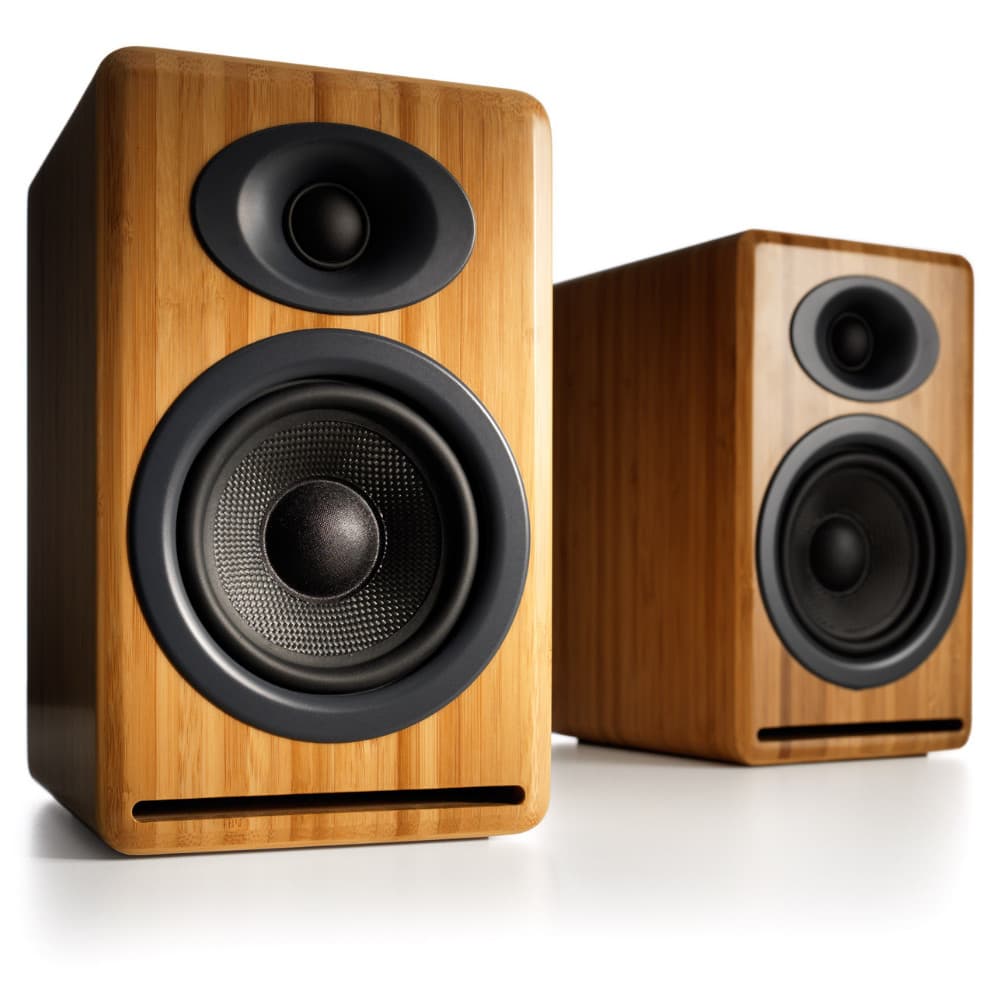
With a sleek, modern look on the outside and state-of-the-art technology on inside, Audioengine's P4 Passive Speakers are perfect for stereo receivers, integrated amps, and tube amplifiers. Works especially well with our N22 Desktop Amplifier.
Technical Specifications

General Specifications

Type
2-way passive speaker system, front ported design, power amplifier or AV receiver required

Amplifier Type
N/A

Power Output
N/A

Drivers
4″ aramid fiber woofers

0.75″ silk dome tweeters

Inputs
Gold-plated, 5-way binding posts

Outputs
N/A

Input Voltages
N/A

SNR
N/A

THD+N
N/A

Crosstalk
N/A

Frequency Response
60 Hz-22 kHz ±1.5 dB

Frequency Response w/ Bass Reduction Switch selected
N/A

Analog Input Impedance
N/A

Nominal Impedance
4 ohms

Input Impedance
N/A

Crossover Frequency
N/A

Protection
N/A

Power Consumption
N/A

Standby Consumption
N/A

Phase
N/A

Recommended Amplifier Power
10-125 W per channel

Battery Life
N/A

Battery Charge Time
N/A

Weights And Measures

Dimensions (HWD)
9.2″ (23.4 cm) x 5.5″ (14 cm) x 6.5″ (16.5 cm)

Weight
6 lb (2.7 kg)

Total Shipping Weight
14.8 lb (6.7 kg)

Shipping Box Dimensions (LWH)
18″ (45.7 cm) x 9″ (22.9 cm) x 13″ (33 cm)

Environmental Requirements

Operating temperature: 32 degrees F to 95 degrees F
Non-operating temperature: -4 degrees F to 113 degrees F
Relative humidity: 5% to 95% non-condensing

Materials And Construction

0.5″ (13 mm) thick MDF cabinets
4″ (102 mm) aramid fiber woofers with advanced voice coils
0.75″ (20 mm) silk dome tweeters with neodymium magnets

Cabinets

To minimize unwanted resonances and distortion, Audioengine cabinets have thick high-resin MDF walls with extensive internal bracing. Heavy internal sound-damping material is used to reduce unwanted sound reflections inside the cabinet. All cabinet edges are rounded which look great and reduce high-frequency diffraction effects on the front baffles. The P4 cabinet contains tuned, front-port slots.

Furniture Grade Finishes

The P4 cabinets are available in several handsome finishes, including bamboo veneers as well as satin black and high-gloss white paint, offering a wide choice for complementing room furnishings.

Custom Components

Audioengine designs and manufactures our own speaker drivers and other critical components. In other words, the P4 is not a box-built system with off-the-shelf parts, but includes custom-designed components constructed to our specifications. What we do not fabricate directly inside our factories we have made to our specific designs and parts such as circuit boards, transformers, magnets, and wiring harnesses, for example.

Based On Studio Monitor Designs

Studio monitor speakers are used by producers and engineers in recording and production studios. They are designed with a theoretical flat frequency response which allows the engineer to create a final mix in such a way that the recorded music will sound good on most other speakers. Although Audioengine speakers are not designed to be up-close “nearfield” studio monitors, we do carry over much of the same higher-end technology, components, and design philosophy for all Audioengine speaker systems.

Driver Designs

Audioengine uses audiophile quality, ferrofluid-cooled, silk dome tweeters with Neodymium magnets. Silk tweeters hold up well under high power and the edge-driven design gives very smooth response. The woofers are aramid fiber woven glass composite with rubber surrounds. Aramid fiber is obviously very strong, which means that the woofer retains its shape when being driven at high levels. The speaker materials and construction are robust enough to stand up to some serious thrashing, so speaker grills aren’t needed. In other words, we did our homework on the speaker drivers and they will sound and look great after many years of use.

Shielding

Both drivers are directly magnetically shielded which allow you to place the speakers within a few inches of a video monitor. This shielding also offers protection for hard drive-based digital music players.

Quickstart Guide

P4 Quick Setup

Connecting your Speakers

To connect your P4 speakers to a receiver or amp you will need 2-conductor stranded speaker wire. All Audioengine speakers use high quality, five-way gold plated binding posts that will accept heavy gauge bare wire, banana plugs, spade lugs, or pin terminators. We recommend your speaker wire be at least 16 gauge and that you use the same length of wire from your amplifier to each speaker. It’s also a good idea to turn off your receiver/amplifier before connecting your speakers.

Preparing the Speaker Wire

  1. Separate the last 3” of each speaker wire conductor.
  2. Strip ½” of insulation from the end of each wire.
  3. Twist the exposed copper strands with your fingers 3 or 4 times so the strands stay together.

Note: As you make your connections, be sure to connect the positive (+) terminals on your receiver to the positive (+) terminals on your speakers. Even if your wire does not have (+) or (-) markings, most 2-conductor speaker wire has printing on one side to help you differentiate between the wire pairs.

If you are Using Bare Wire

  1. Use your thumb and finger to unscrew the binding post connectors on the back of each speaker.
  2. Insert each speaker wire into the holes on the side of the binding post connectors, observing proper polarity.
  3. Retighten the binding posts with your fingers.
  4. The stripped portion of the wire should be secured firmly in each connector.
  5. Make sure that none of the speaker wire strands have come in contact with an adjoining terminal.


For the full setup guide, download the attached PDF:
P4_Setup Guide_v2


P4 Setup Video

Troubleshooting

HDP6 and P4 Troubleshooting Tips

The following troubleshooting tips can help diagnose and correct most concerns with the HDP6 or P4. We have attempted to make this list as comprehensive as possible, so some of these may not apply to your issue, but please go through each tip.

  1. Verify that the power controls for your amp, preamp, and/or AV receiver are powered on and working.
  2. Check that the volume level of your audio source components or devices are turned up.
  3. Check the speaker wire connections from your amp to the speakers by removing the speaker wire from each speaker and then reconnecting.  Also check the speaker wire polarity by verifying that the wires are going to the same terminals on both speakers.
  4. Check that the cables from your audio source(s) to the amplifier are properly connected. Confirm this by unplugging the audio cables and then reconnecting.
  5. Try using different audio input sources and/or devices to see if the problem follows.
  6. Try swapping inputs to the left and right speaker to see if the issue remains in the same channel or follows the speaker.
  7. If you are using a computer with your setup, make sure the volume is up on your media players, internet radio, master control, device volume, etc. and that the balance control is centered.
  8. If you are using a wireless adapter, preamp, or external DAC, remove these (temporarily) and connect the audio source directly to the amp/speakers.
  9. If your input source has its own EQ (equalizer), please make sure the low end is at a moderate level as having too much bass can cause distortion.
  10. Move your amp and HDP6/P4 speakers to a different location to see if something is causing interference in the current setup.  Something as simple as a wireless internet router, cordless or mobile phone, or halogen lamp nearby can cause interference.

FAQ's

Select the fields to be shown. Others will be hidden. Drag and drop to rearrange the order.
  • Image
  • SKU
  • Rating
  • Price
  • Stock
  • Availability
  • Add to cart
  • Description
  • Content
  • Weight
  • Dimensions
  • Additional information
Click outside to hide the comparison bar
Compare