

HXL Portable Balanced Headphone Amplifier and HiFi DAC
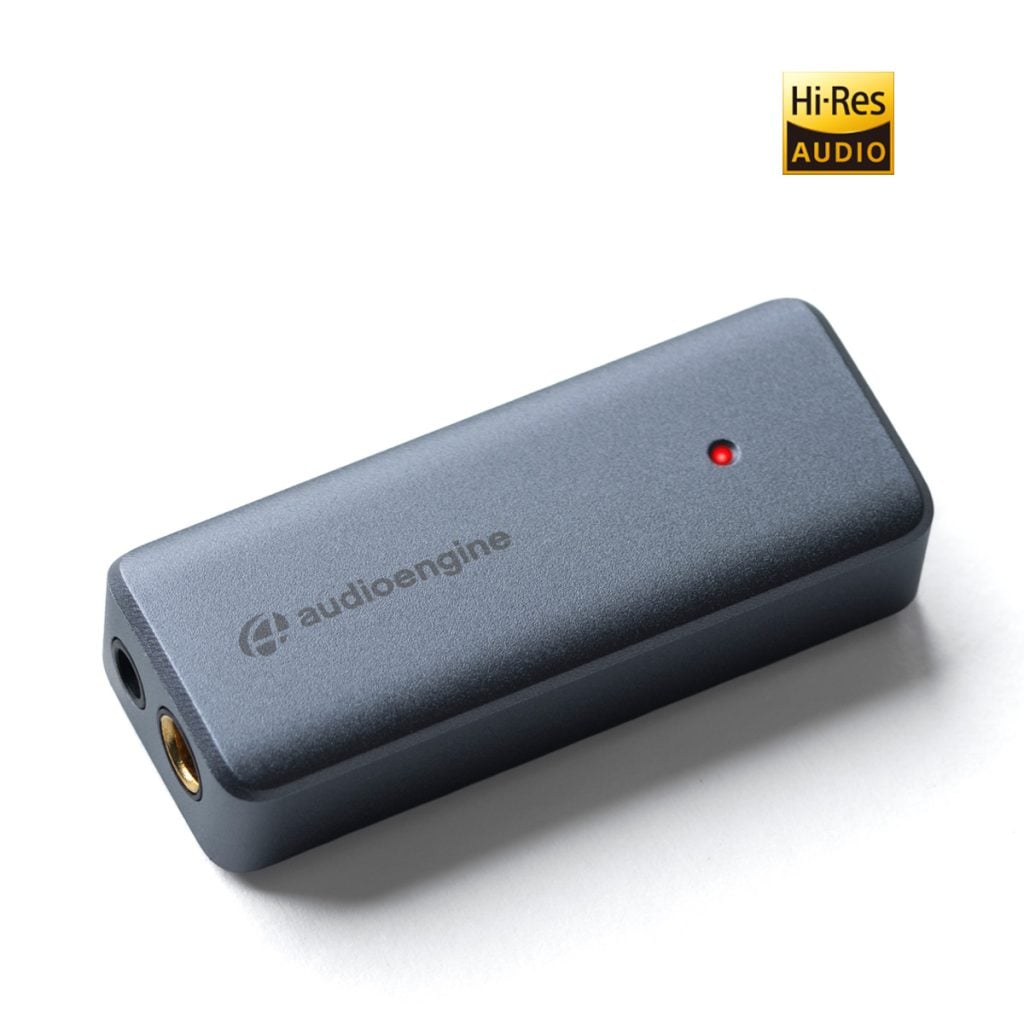
The Audioengine HXL is a 32-bit portable balanced headphone amplifier and hi-fi DAC built to unleash the full potential of your music, no matter where you are. It delivers powerful, high-fidelity sound straight from your phone, tablet, or computer, powered directly through USB-C with no batteries to charge. Equipped with both 3.5mm and 4.4mm outputs, it drives everything from your favorite in-ear monitors to demanding studio-grade headphones. By bypassing built-in sound cards, the HXL delivers a clear, detailed upgrade to your everyday listening. Its balanced output provides extra headroom, tighter bass, and a whisper-quiet noise floor, making it the ideal travel companion or desktop powerhouse for music lovers who want to hear every detail.
Technical Specifications
General Specifications
DAC type
USB-C
Input
USB-C audio
D/A converter
SA9312 + Dual CS43131
USB transfer mode
Asynchronous dual clock
USB device class
UAC 2.0
Input bit depth
32 bit
Input sample rate
PCM: Up to 32-bit / 384kHz
DSD: DSD64 / DSD128 (DoP), DSD256 (Native)
Output
3.5mm single-ended
4.4mm balanced
Full-scale output level
2.06Vrms @ 600Ω (3.5mm)
4.09Vrms @ BAL
Output impedance
<0.5Ω
Recommended headphone impedance range
10Ω – 600Ω
Headphone amplifier
LME49726
Frequency response
20Hz – 40kHz ±0.1dB
SNR
132dB (BAL), 125dB (3.5mm)
THD+N
0.0002% (112dB)
Crosstalk
-129dB (BAL), -96dB (3.5mm)
Power requirement
Standby: ~75mA
Active: ~120mA (Pink noise @ 50%, 32-bit 384kHz)
USB power filtering
2-stage redundant regulation
Product dimensions
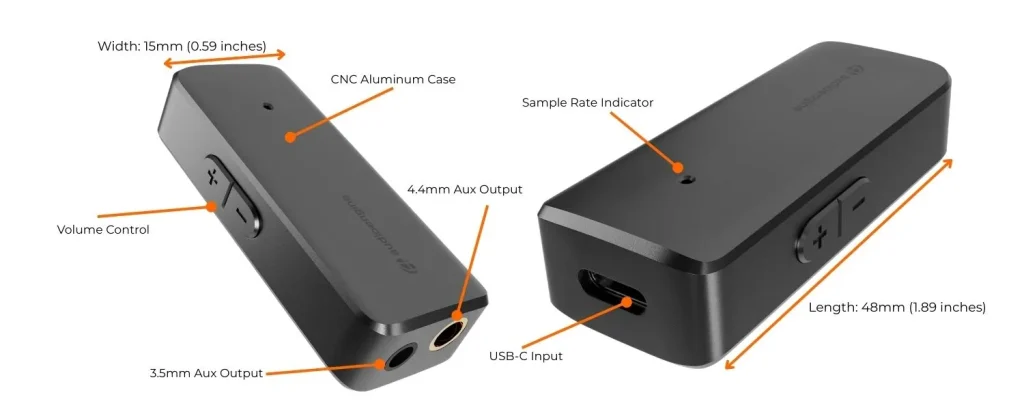
1.9” (48mm) ×0.6” (15mm) ×0.375″ (10MM)
Shipping weight
1.0lbs (0.5kg)
Environmental
Operating Temperature: 32 to 95 degrees F
Non-operating Temp: -4 to 113 degrees F
Relative Humidity: 5% to 95% non-condensing
Included accessories
Lightning to USB-C adapter and USB-C to USB-C cable
Setup guide
Dual Headphone Outputs
The HXL includes both 3.5mm and 4.4mm balanced outputs, giving you flexibility for everything from sensitive in-ear monitors to demanding studio headphones. Balanced output delivers more headroom, tighter bass, and a quieter noise floor for a true hi-fi listening experience.
Pocket-Sized Power
The compact design of the HXL makes it easy to take anywhere while delivering serious performance. Built from precision-machined aluminum, it’s rugged enough for travel and clean enough for your desktop, proving that portable gear doesn’t have to compromise on quality.
No Batteries, No Charging
Forget about managing extra power cords or waiting for a charge. The HXL draws power directly from your phone, tablet, or computer through a single USB-C connection, keeping your setup clean and ready to play at a moment’s notice.
Upgrade Any Audio Source
Bypassing the built-in sound card of your computer or mobile device, the HXL acts as a high-quality DAC and headphone amplifier in one. Use it to power headphones or connect directly to powered speakers or a Home Music System for a clear, detailed upgrade to any setup.
Quickstart Guide
HXL Quick Setup
Step 1: Connect the HXL to your phone, tablet or computer’s USB-C port using the included cables. (USB-C to Lightning adapter or USB-C to USB-C cable for iOS devices, MacOS, Android and Windows).
For PC, the HXL should be recognized automatically.
For Mac, under System Preferences/Sound, select “Audioengine HXL” as the sound output.
Step 2: Connect the 3.5mm/4.4mm output of your HXL to wired headphones, or any audio input of your powered speakers, stereo system, etc.
Note that the audio cables to connect your HXL to a stereo system are not included with the HXL.
Step 3: Adjust the volume on your device and HXL via the side panel control to a medium level and start playing music.
For the full setup guide, download the attached PDF:
HXL Quickstart Guide
Troubleshooting
HXL Troubleshooting Tips
The following troubleshooting tips can help diagnose and correct most concerns with the HXL. We have attempted to make this list as comprehensive as possible. So, even though some of these may not apply to your issue, please still go through each one.
- Restart your phone, tablet, or computer and make sure your computer’s OS and all related apps are up-to-date.
- Verify that the audio cable (or headphone) connection out of the HXL is complete and in working order. You can do this by unplugging the cable and then reconnecting.
- If using a computer, disconnect all other USB-C devices temporarily to see how this affects HXL playback. Audio over USB-C and bus powering a device can both be somewhat demanding. USB-C ports can share a bus internally and can also share their bus with devices internally as well. Because of this, some ports may not perform as well as others; so be sure to try each USB-C port one at a time.
- If using Windows, uninstall the USB-C driver from your computer. Then disconnect the HXL from your computer and plug it back in to allow the driver to re-install automatically. You can find complete instructions from Microsoft on how to reinstall a plug-and-play device under Windows here.
- If you are using a Mac, try a NVRAM/PRAM reset. This resets the system configurations for some audio and video-related items and can often times help clear up problems related to audio. See Apple’s support page for information on how to do this. Also, be sure to check the App store to see if there’s a newer version of Mac OS you could be running.
- Try music with different bit depths and sample rates. On a Mac these settings are under Applications –> Utilities –> Audio MIDI Setup. Try using both 16-bit and 24-bit, as well as 32-bit settings.
- Experiment with using a different media player (iTunes, Songbird, WinAmp, Cog, etc) and different audio file types (MP3, ALAC, FLAC, etc). And if your media library is located on an external drive or network attached storage (NAS), try playing audio files on your internal local hard-drive.
- If possible, try your HXL with a different device to see if something is causing an issue in the current setup.
FAQ's
The HXL will work with Android or any device that can operate as a USB-C host, can provide enough power via USB-C, and includes generic drivers for standard USB-C audio playback. A device with Android 6.0 or later should have both USB-C host mode and native plug-and-play functionality for USB-C audio, so you could connect the two together using the included USB-C cable.
The HXL is essentially a very high-end external sound card. Its components and implementation of those components make it more capable than what might be built into a computer, not to mention the benefit of moving those sensitive components outside and away from the potentially noisy interior of your computer. All of this means the signal your speakers or wired headphones receive will be clearer, with a lower noise-floor, and with a more pronounced dynamic range over your internal sound card.
To get things up and running only takes 3 simple steps. You would just need to first connect the included USB-C cable from your device’s USB-C port to the HXL; then you’ll need to connect the 3.5mm/4.4mm output of your HXL to headphones, or any audio input of your powered speakers, stereo system, etc.
Next, if using a Mac, you will need to go to System Preferences/Sound, and select “Audioengine HXL”; if you’re using a PC, no setting changes are needed as the computer will automatically find the USB-C driver. Finally, you’ll just need to adjust the volume on your device and HXL to medium and you’re ready to play music from iTunes or your favorite media player and that’s it! Setup really is that easy!
The HXL includes a headphone amplifier based on the LME49726 delivers 32-bit precision, high dynamic range and ultra low distortion. This headphone amp is able to provide low-impedance, high-fidelity audio to a wide range of wired headphones.
DAC type
USB-C
Input
USB-C audio
DAC Chipset
SA9312 + Dual CS43131
USB transfer mode
Asynchronous dual clock
USB device class
UAC 2.0
Input bit depth
32 bit
Input sample rate
PCM: Up to 32-bit / 384kHz
DSD: DSD64 / DSD128 (DoP), DSD256 (Native)
Output
3.5mm and Balanced 4.4mm
Full-scale output level
2.06Vrms @ 600Ω (3.5mm)
4.09Vrms @ BAL
Output impedance
<0.5Ω
Recommended headphone impedance range
10Ω – 600Ω
Headphone amplifier
LME49726
Frequency response
20Hz – 40kHz ±0.1dB
SNR
132dB (BAL), 125dB (3.5mm)
THD+N
0.0002% (112dB)
Crosstalk
-129dB (BAL), -96dB (3.5mm)
Power requirement
Standby: ~75mA
Active: ~120mA (Pink noise @ 50%, 32-bit 384kHz)
Product dimensions
48 × 15 × 10 mm
Shipping weight
1.0lbs (0.5kg)
Environmental
Operating Temperature: 32 to 95 degrees F
Non-operating Temp: -4 to 113 degrees F
Relative Humidity: 5% to 95% non-condensing
Included accessories
USB-C to Lightning adapter and USB-C to USB-C cable
Setup guide
Other Components:
External low-noise crystal oscillator
Low jitter PLL internal clock
Low noise LDO regulator
Asynchronous mode operation
LED Playback Indicators
• Red: Power / PCM 48kHz
• Green: PCM 88.2 – 96kHz
• Yellow: PCM 176 – 384kHz
• Blue: DSD64 / DSD128 / DSD256
Pocket-Sized Power
The compact design of the HXL makes it easy to take anywhere while delivering serious performance. Built from precision-machined aluminum, it’s rugged enough for travel and clean enough for your desktop, proving that portable gear doesn’t have to compromise on quality.
Dual Headphone Outputs
The HXL includes both 3.5mm and 4.4mm balanced outputs, giving you flexibility for everything from sensitive in-ear monitors to demanding studio headphones. Balanced output delivers more headroom, tighter bass, and a quieter noise floor for a true hi-fi listening experience.
No Batteries, No Charging
Forget about managing extra power cords or waiting for a charge. The HXL draws power directly from your phone, tablet, or computer through a single USB-C connection, keeping your setup clean and ready to play at a moment’s notice.
Upgrade Any Audio Source
Bypassing the built-in sound card of your computer or mobile device, the HXL acts as a high-quality DAC and headphone amplifier in one. Use it to power headphones or connect directly to powered speakers or a Home Music System for a clear, detailed upgrade to any setup.
Simple, Hassle-Free Operation
No drivers. No apps. No setup headaches. Just plug the HXL into your device and start listening. LED indicators clearly display playback resolution, and the onboard 60-step volume control gives you precision without adding bulk or complexity.
Step 1: Connect the HXL to your phone, tablet or computer’s USB-C port using the included cables. (USB-C to Lightning adapter or USB-C to USB-C cable for iOS devices, MacOS, Android and Windows).
For PC, the HXL should be recognized automatically.
For Mac, under System Preferences/Sound, select “Audioengine HXL” as the sound output.
Step 2: Connect the 3.5mm/4.4mm output of your HXL to wired headphones, or any audio input of your powered speakers, stereo system, etc.
Note that the audio cables to connect your HXL to a stereo system are not included with the HXL.
Step 3: Adjust the volume on your device and HXL via the side panel control to a medium level and start playing music.
For the full setup guide, download the attached PDF:
HXL Quickstart Guide
- Verify that one of the included cables is completely plugged into the HXL and your source device.
- Also, verify that the 3.5mm/4.4mm headphone outputs are firmly plugged in.
- Try disconnecting and reconnecting both the USB-C and 3.5mm/4.4mm cable.
- You will see an LED light confirming the HXL is getting power and is connected to an output.
- Check the volume level on your source.
- If connected to a computer, verify that the HXL is recognized and the active output device.
- Try restarting your computer.
If none of the above helps resolve your issue, please contact our Support Team for additional assistance.
Please check that the volume control on your phone/tablet/computer is up and at a good level; 75% should be a good level. Also try adjusting the volume on the HXL as well.
The HXL uses the SA9312 + Dual CS43131 DAC chipset
If you do not have headphones connected to the HXL, the LED light will turn off after cycling through. This is an intended feature to help save device power when headphones are unplugged.
HXL can easily drive wired headphones with impedances of 10 ohms or higher.
The HXL only needs 120mA USB power to work, which most all modern source devices are capable of.