

A2+ Gen 3 Home Music System w/ Bluetooth aptX Adaptive
Pro Tip For superior desktop audio, use the A2+ Gen 3's USB-C or Bluetooth input. This bypasses your computer's lower quality audio components, allowing the built-in DAC to provide a clearer, more detailed sound.
Technical Specifications
General Specifications
Type Powered Bluetooth aptX-Adaptive speaker system
Amplifier Type Class D
Rated Power Output 20W RMS per channel at 4 ohms (measured in compliance with 16 C.F.R. § 432.3)
Peak Power Output 30W per channel at 4 ohms (AES)
Total Peak Power Output 60W (AES)
Drivers 2.75” aramid fiber woofers 0.75“ Silk dome tweeters
Inputs 3.5 mm stereo mini-jack, RCA L/R, USB, Bluetooth
Outputs RCA variable line-out
Input Voltages 100-240 V 50/60 Hz auto-switching
SNR >95 dB (typical A-weighted)
THD+N Less than 0.05% at all power settings
Crosstalk <50 dB
Frequency Response 65 Hz-22 kHz ±2.0 dB
Frequency Response w/ Bass Reduction Switch selected N/A
Analog Input Impedance N/A
Nominal Impedance N/A
Input Impedance 10K ohms unbalanced
Crossover Frequency N/A
Protection Output current limiting, thermal over-temperature, power on/off transient protection
Power Consumption Idle: 5W
Standby Consumption N/A
Phase N/A
Recommended Amplifier Power N/A
Battery Life N/A
Battery Charge Time N/A
Bluetooth Specifications
Internal BT Receiver Qualcomm QCC 3040
Input Bit Depth 16 bit (SBC, AAC), 24 bit (aptX-Adaptive, aptX-HD, aptX)
Bluetooth Receiver Type Bluetooth 5.3
Supported Codecs aptX-Adaptive, aptX-HD, aptX, AAC, SBC
Supported Bluetooth Profiles A2DP
Wireless Operation Range Up to 100 ft (30 m) typical
Input Data Rate Determined by Bluetooth
Wireless Latency ~120 milliseconds (ms)
USB Specifications
Connector Type USB TYPE-C
USB Device Class type 1.1 and above
Input Bit Depth 24 bit (padded)
Input Sample Rate 44.1KHz/48 KHz/96KHz
Internal D/A Converter PCM5100A
Weights And Measures
Dimensions (HWD) Each speaker – 6″ (15.6 cm) x 4″ (10.6 cm) x 5.25″ (13.8 cm)
Weight Left (active) – 3.6 lb (1.72 kg)
Right (passive) – 3.2 lb (1.51 kg)
Total Shipping Weight 10 lb (4.51 kg)
Shipping Box Dimensions (LWH) 15” (38.1 cm) x 7” (17.8 cm) x 10.5” (26.7 cm)
Environmental Requirements
Operating temperature: 32 degrees F to 95 degrees F
Non-operating temperature: -4 degrees F to 113 degrees F
Relative humidity: 5% to 95% non-condensing
Materials And Construction
0.24″ (6 mm) thick MDF cabinets
0.75″ (20 mm) silk dome tweeters with neodymium magnets
2.75″ (70 mm) aramid fiber woofers with advanced voice coils
Cabinets
To minimize unwanted resonances and distortion, Audioengine cabinets have thick high-resin MDF walls with extensive internal bracing. Heavy internal sound-damping material is used to reduce unwanted sound reflections inside the cabinet. All cabinet edges are rounded which look great and reduce high-frequency diffraction effects on the front baffles. The A2+ Gen 3 cabinet contains tuned, front-port slots.
Furniture Grade Finishes
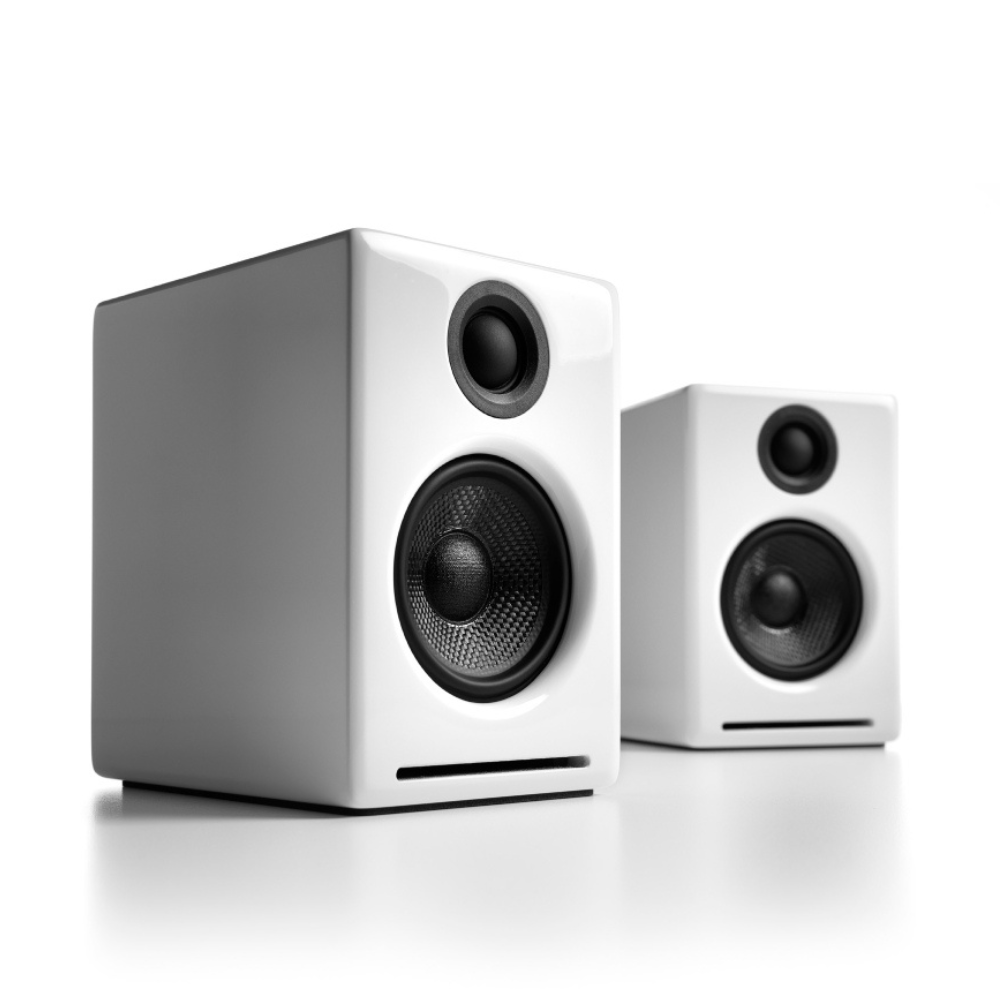
The A2+ Gen 3 cabinets are available in several handsome, high-gloss finishes, including black, white and red paint, offering a modern compliment to any small space or desktop.
Custom Components
Audioengine designs and manufactures our own tweeters, woofers, and other critical components. In other words, these are not “box built” speakers with off-the-shelf parts but custom-designed to our specifications. What we do not fabricate directly in our factory we have made to our designs (parts such as transformers, magnets, and wiring harnesses, for example). The cabinets, drivers, bass port designs, amplifiers, and crossovers are all painstakingly tuned together for each Audioengine model. This, in turn, makes for a much more efficient system that requires much less power than passive speakers and a separate integrated amplifier or similar A/V components.
Based On Studio Monitor Designs
Studio monitor speakers are used by producers and engineers in recording and production studios. They are designed with a theoretical flat frequency response which allows the engineer to create a final mix in such a way that the recorded music will sound good on most other speakers. Although Audioengine speakers are not designed to be up-close “nearfield” studio monitors, we do carry over much of the same higher-end technology, components, and design philosophy for all Audioengine speaker systems.
Efficient Integrated Design
The speaker cabinets, drivers, innovative bass port designs, amplifiers, and passive crossovers are all critically tuned together for each Audioengine model. This, in turn, makes for a much more efficient system that requires less power than passive speakers and a separate integrated amplifier or similar A/V components. We build all this goodness into the left speaker cabinet to make it super-easy to connect your smartphone, tablet, computer, TV, network player or any other audio product.
High-quality Bluetooth Audio
The Bluetooth built into the A2+ Gen 3 Wireless speakers features aptX-HD coding which is an advanced Bluetooth audio codec with very impressive sound. And even if your phone or tablet does not have aptX-HD, the A2+ Gen 3 Bluetooth solution is backwards-compatible with aptX, AAC, SBC codecs, so you can wirelessly stream music from any Bluetooth-enabled device and still enjoy all your music. High-fidelity Bluetooth aptX-HD that really works and sounds great.
Extended-range wireless. Most Bluetooth implementations have very limited range, typically within just one room. But with careful signal management circuitry and antenna tuning, we offer a superior solution that has up to 3 times the range of standard Bluetooth for multi-room use, with no degradation in audio quality.
24 bit DAC
The A2+ Gen 3 Bluetooth receiver utilizes the PCM 2704C DAC, known for extremely-low quantization noise in the audio band, with a built-in analog low-pass filter that removes the high-frequency components of the noise-shaping signal.
Amplifier Design
The amplifiers in powered Audioengine speakers are located in the left speaker and are a conservatively-rated class D.
Driver Designs
Audioengine uses audiophile-quality, ferrofluid-cooled silk dome tweeters with neodymium magnets. Silk tweeters hold up well under high power and the edge-driven design gives very smooth response. The woofers are aramid fiber woven glass composite with rubber surrounds. Aramid fiber is obviously very strong, which means the woofer retains its shape when being driven at high levels.
Shielding
Both drivers are directly video shielded and allow the user to place the speakers within a few inches of a video monitor. This shielding also offers protection for hard-drive digital music players.
Quickstart Guide
A2+ Wireless Quick Setup
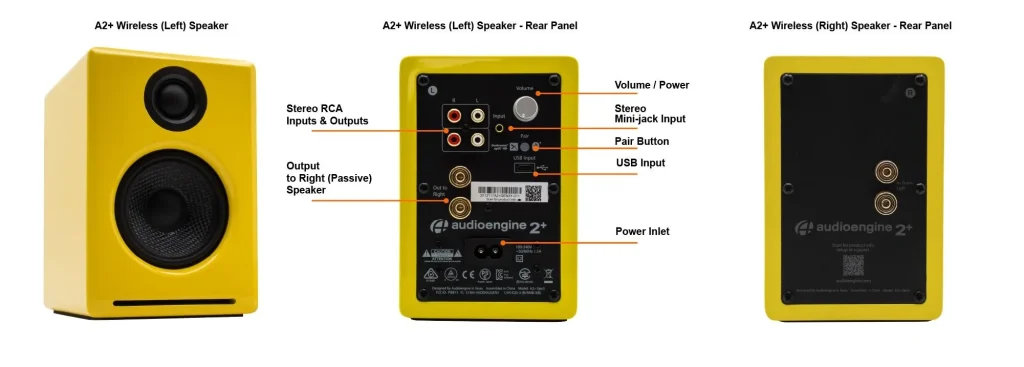
Step 1: Connect the included speaker wire from the A2+ left (powered) speaker to the right (passive) speaker, observing proper polarity to each speaker connector.
1) Use your thumb and finger to unscrew the binding post connectors on the back of each speaker.
2) Insert each speaker wire into the holes on the side of binding post connectors, making sure to connect the positive (+) terminal on the left speaker to the positive (+) terminal on the right speaker.
3) Retighten the binding posts with your fingers.
4) Verify that only the exposed portion of the speaker wire is secured firmly in each connector.
5) Make sure that none of the speaker wire strands have come in contact with an adjoining terminal.
Step 2: Verify that the volume/power knob on the rear panel of the left speaker is in the OFF position by rotating the knob until it clicks off..
Step 3: Connect the cable from the external power supply to the A2+ left speaker rear panel.
Step 4: Connect the Ac power cord to the other end of the power supply, and plug the cord into a functioning power outlet. A light on the power supply should be illuminated.
Wireless Connection
Step 1: Turn power on via the rear panel volume/power knob.
A2+ Wireless will automatically go into Bluetooth “pair mode” and the Pair button on the A2+ Wireless rear panel will start flashing.
Step 2:: On your device (phone, tablet, computer, etc), turn on Bluetooth and go to Bluetooth preferences.
Step 3: Select “Audioengine A2+” to pair and connect. The Pair indicator on the A2+ rear panel should be solid.
Step 4: Play your music and adjust volume levels on A2+ Wireless and your device.
Step 5: To add additional devices put A2+ back into pair mode by disconnecting A2+ from your device or by pressing and holding the Pair button on the A2+ Wireless rear panel until the pair indicator starts flashing. Repeat steps 2-4 to connect another device.
A2+ can wirelessly connect to only one device at a time, however it will pair with and remember up to 6 different devices.
Wired Connection
Step 1: Connect an audio cable between your device and one of the inputs on the A2+ rear panel.
Step 2: Play your music and adjust the volume on the speakers and your device to the desired listening levels.
USB Audio Connection
Step 1: Connect the included USB cable between your computer and the USB input on the rear panel of the left powered speaker.
Step 2: If using Windows, the A2+ should be recognized automatically. For MacOS, under System Preferences/Sound/Output, select “Audioengine A2+”.
For the full setup guide, download the attached PDF:
A2+ Wireless Quickstart Guide
Troubleshooting
A2+ Wireless Troubleshooting Tips
The following troubleshooting tips can help diagnose and correct most concerns with the A2+ Wireless. We have attempted to make this list as comprehensive as possible, so some of these may not apply to your issue, but please go through each tip..
If the power indicator on the A2+ external power supply unit is not illuminated, try these tips:
- Make sure the AC power cord is connected to the power supply unit and to a working AC power outlet.
- Check that the cable at the other end of the power supply is correctly connected to the rear panel of the left speaker.
If the power supply light is on but you are experiencing an audio-related issue with a wired connection, try these tips:
-
- Verify that the volume/power control on the rear panel is not turned all the way down or powered off (we recommend setting the volume to at least the 10 o’clock position)
- Check that the volume level of your audio source components or devices is not set to minimum volume or powered off.
- Check speaker wire connections from the left (powered) speaker to the right (passive) speaker. Confirm this by removing the speaker wire from on each speaker and reconnecting. Also check the speaker wire polarity by verifying that the wires are going to same terminals on both speakers.
- Check that the cables from your audio sources to the speakers are properly connected. Confirm this by unplugging the audio cables and then reconnecting.
- Decrease the volume of the input audio source and increase the volume of the speakers.
- Try using different audio input sources and/or devices to see if the problem follows.
- Try swapping your left and right speaker via the RCA left and right inputs to see if the issue remains in the same channel or follows the speaker.
- If you are using a computer with your A2+ Wireless, make sure the volume is up on your media players, internet radio, master control, device volume, etc. and the balance control is centered.
If your input source has its own EQ, please make sure the low end is at a moderate level, as having too much bass can cause distortion.
- If you are using a wireless adapter, preamp, or external DAC with these speakers, remove them (temporarily) and connect the audio input source directly to the speakers.
- Move your speakers to a different location to see if something is causing interference in the current setup. Something as simple as a wireless internet router, cordless or mobile phone, or halogen lamp near the speakers can cause interference.
A2+ Wireless troubleshooting tips – internal USB digital-to-analog converter
Try these tips if your computer is not recognizing the speaker through your computer’s USB input or the sound through USB isn’t functioning correctly.
If you are using a Windows computer, uninstall the USB driver from your computer. Then disconnect the USB cable to remove the A2+ from your computer and plug it back in to allow the USB driver to re-install automatically. You can find complete instructions from Microsoft on how to reinstall a plug-and-play device under Windows here.
If you are using a Mac, try a NVRAM/PRAM reset. This resets the system configurations for some audio and video related items and can many times help clear up problems related to audio. See Apple’s support page for information on how to do this.
A2+ Wireless troubleshooting tips – Bluetooth
- Verify that the A2+ is connected to power and that the front volume knob is turned clockwise past the detent position (you should feel a click). If you haven’t already, power-cycle your speakers by switching them off and back on.
- If your A2+ is already connected to a device via Bluetooth, the Bluetooth pair light on the back panel of the left speaker will be on and solid (note that if your A2+ has been idle and not connected to a device for more than 2 minutes, the Pair light will automatically turn off). Tap the Pair button and it should begin blinking (or pair to your A2+ using your source device, and the LED will go from off to on and solid).
- Try playing audio from more than one application on your phone/tablet, or computer.
- Check to make sure your source device (computer, tablet, phone, etc) is running the most up-to-date version of software available. For Mac OS users, be sure to check the App store to see if there’s a newer version of Mac OS you could be running.
- Try disconnecting from and forgetting the A2+ through your device’s Bluetooth settings, and re-pairing to the A2+.
- Try using a different source device with your A2+ to see if the issue follows. Also be sure to test your A2+ using the analog input as well.
- If possible, try your A2+ in a different location to see if something is causing an issue in the current setup. Something as simple as a wireless internet router, cordless or mobile phone, or halogen lamp near the speakers may be causing interference in your setup.
FAQ's
Each speaker is 6″ (15.2 cm) x 4″ (10.2 cm) x 5.25″ (13.3 cm)
Yes! We incorporate all the relevant functions and features from Bluetooth 5.0 that apply to our products! These features include; extended range, low latency (so that video and audio sync properly), as well as higher level aptX-HD, aptX, and AAC codecs (with the exception of our 512 portable speaker which supports SBC only). Keep in mind that the capability of the source is what controls the Bluetooth experience.
Absolutely! To do so:
- Open the Alexa App on your smartphone or tablet (Apple link | Google Play Link)
- Tap the “Devices” icon and select the Echo/Alexa device you want to connect to speakers
- Select “Bluetooth Devices”
- Select “Pair New Device”
- Find your Audioengine wireless speaker on the list of available Bluetooth devices, and select it
No. The Bluetooth and USB inputs both share the internal DAC for processing, so you can only listen to one at a time, with Bluetooth taking priority. If you’re using USB for example, and start using Bluetooth, the USB signal will cut and Bluetooth will take over. Depending on your source, if you pause or disconnect from Bluetooth the speakers may automatically switch back to USB after a few seconds.
Yes, you can. The A2+ Wireless speakers use a switching power supply so it will automatically convert to the different voltage. The power cable is also detachable which makes it convenient to replace the AC plug with a different type if you don’t want to use an adapter plug.
Absolutely! You can connect any Audioengine speaker with an analog output to any Sonos product that has the Line-In feature. You can also connect any Audioengine passive speakers into an existing Sonos system using the Sonos Amp.
Absolutely! You will need to pick up Apple’s Lightning to USB 3 Camera Adapter, which allows a USB connection to the iPad (and, as of iOS7, the iPhone). Then just hook up as you would from a computer. You can even charge your iPhone or iPad while you use it this way!
Yes they do! They are equipped with a power-saving circuit that turns off the speaker’s final stage amp. This idle mode activates right after you stop playing music. Due to this power-saving function, it’s perfectly fine for the speakers to stay on all the time!
Not necessarily. Audioengine speakers and amplifiers are very efficient. Also, we designed them together as a system; so, we therefore get more volume output than stereo receivers or amplifiers that might have higher wattage or power numbers. Due to this tuning, we achieve big sound outputs with a fraction of the power required by other systems.
No extra software or drivers are needed. The A2+ Wireless is compatible with any device that supports Bluetooth, and the A2DP profile for streaming stereo audio. This includes most smartphones, tablets, and computers. For computers that don’t include BLuetooth support out of the box, you can simply add a USB Bluetooth adapter.
The same is also true for the USB connection on the A2+, which uses plug-and-play drivers provided by your computer’s OS. The A2+ USB input is compatible out of the box with Windows and Mac computers, iPhones and iPads when using Apple’s lightning USB 3 adapter along with a fast wall charger, and should work with most Android Smartphones and Tablets as well.
Our woofers are made of aramid fiber and the tweeter domes are silk. Both of these materials are very robust and can handle quite a bit of abuse. For our A-series speakers we decided against grill covers as they do tend to color the sound a bit. However, without speaker grills they are more cat and kid-friendly! If you do prefer speakers with grills, you can check out our HD3 speakers here:
https://audioengine.mom/shop/wirelessspeakers/hd3-wireless-speakers/
If you’re looking to enhance the bass on your A2+ Home Music System, there are a few steps you can take to achieve the sound you’re looking for:
- Speaker Positioning:
The placement of your speakers can have a significant effect on bass performance. Try placing the speakers closer to a wall, which can naturally amplify the bass. Additionally, ensure that the surface they’re on is stable, as vibrations can impact sound quality. - Use of Equalizer Software:
Windows 11 has built-in sound enhancements, but for more detailed control over the bass and other sound frequencies, we recommend using third-party equalizer software. One highly recommended option is a DSP correction software specifically designed for A2+ Home Music System. You can find more details about this software and how to use it in this article: Enhancing Audioengine A2+.
This software allows for precise adjustments of the bass and other sound settings to give you a more customized listening experience.
If you need any further assistance or have additional questions, feel free to contact our support team!
1. Turn Off and Unplug:
- Make sure your system is turned off and unplugged.
2. Dust the Surfaces:
- Use a soft, dry cloth to wipe away dust.
- For hard-to-reach places, use a soft brush or a can of compressed air.
3. Wipe Down the Exterior:
- We do not recommend using any solvents
- If cleaning off stains or build-up is necessary, we recommend doing so with a very small amount of mild cleaning solution applied only to the affected area, followed by quickly wiping the area dry completely.
- Any scoured pads or objects like a ‘magic eraser’ too easily run the risk of removing sealers and top coats of the painted finish that can leave a clearly visible change in the uniformity of the paint/finish
4. Clean the Speaker Grills:
- The speaker grills can be gently cleaned with a vacuum, preferably using a soft bush attachment.
- A lint roller can also be used.
5. Clean Buttons and Knobs:
- A dry cloth is recommend for cleaning any knobs, buttons or other surfaces
- Be careful not to let water get into any gaps.
6. Clean Ports and Connections:
- Use compressed air to blow out dust from ports and connections.
7. Let Everything Dry:
- Make sure everything is completely dry before plugging back in and turning on.
8. Regular Cleaning:
- Dust your system regularly to keep it in good shape.
By following these steps, you can keep your Audioengine system clean and working well.
If you are experiencing issues with your speakers when connected via USB on a Windows 10+ operating system, it might be due to the DCH (Declarative, Componentized, Hardware Support Apps) drivers. While DCH drivers offer many benefits, they can sometimes cause compatibility issues with USB audio devices, resulting in problems such as delays when sound starts, poor audio quality, or the speakers not being recognized properly.
Solution: To resolve these issues, we recommend switching from DCH drivers to non-DCH (standard) drivers. Here’s a step-by-step guide to help you do that:
- Uninstall the Current DCH Drivers:
- Open the Device Manager on your PC.
- Locate your audio device under “Sound, video, and game controllers.”
- Right-click on the device and select “Uninstall device.”
- Ensure you check the option to delete the driver software for this device to completely remove the DCH drivers.
- Download the Non-DCH Drivers:
- Visit the support website of your motherboard or computer manufacturer.
- Navigate to the driver download section and find the non-DCH Realtek (or appropriate) audio drivers for your system.
- Install the Non-DCH Drivers:
- Download and run the installer for the non-DCH drivers.
- Follow the on-screen instructions to complete the installation process.
- Restart Your PC:
- After installing the non-DCH drivers, restart your computer to apply the changes.
By switching to non-DCH drivers, the compatibility issues with your USB speakers should be resolved, allowing you to enjoy optimal audio performance.
Additional Tips
- Check for Firmware Updates: Ensure your speakers have the latest firmware installed. Visit the manufacturer’s website for firmware updates that may improve compatibility and performance.
- USB Ports: Try connecting your speakers to a different USB port to see if the issue persists.
- Contact Support: If you continue to experience issues, please contact our customer support team. Provide details about your operating system, motherboard model, and the specific problems you are encountering.
We hope this helps you resolve any issues and enhances your experience with our speakers. If you have further questions or need assistance, don’t hesitate to reach out to our support team.
Once your A2+ Wireless is paired and connected via Bluetooth, then any app (TIDAL, Music, Spotify, etc.) will automatically play your music through Bluetooth.
All turntables require a phono preamp stage before connecting to Audioengine speakers. Many turntables have this built-in , while others do not and would require an external phono preamp. Check the turntable manufacturer’s website or user manual. Some turntables may even include Bluetooth, in which case you can pair and connect them to the speakers wirelessly!
The A2+ Wireless work excellent via Bluetooth, but they can also be used wired, with more traditional source devices like Turntables, CD players, or anything else with a standard analog audio connection like RCAs or 3.5mm stereo-mini. They also include a USB port for use with a Windows or Mac computer, as well as many Smartphones and Tablets with the right USB adapter cable.
You can absolutely still use the A2+ Wireless and it will sound great. AptX is a high-quality Bluetooth audio codec that works really well. In addition aptX, and the default Bluetooth codec SBC, The A2+ Wireless support other high quality audio codecs, like AAC for use on Apple iPhone and iPads, as well as Android devices that do not include aptX.
This issue occurs because some computers fail to “wake up” the USB port after a period of inactivity. While our A2+BT uses UPnP drivers for maximum compatibility, the USB connection is identified as an external DAC by most systems. Recent operating system updates for Mac and Windows have made this issue more frequent.
1. What solutions can I try to resolve this issue?
The solution often requires trial and error based on your specific computer setup. Many customers have found helpful tips and solutions in the following resources:
- For Mac users: Apple Community Thread
- For Windows users: StarTech USB Issues FAQ
2. Is there a difference in audio quality when using USB/Bluetooth versus analog connections?
Yes, there is a difference. Here’s what you need to know:
- USB/Bluetooth Connection: This uses the digital-to-analog converter (DAC) built into the A2+BT speakers, which is 16-bit.
- Analog Connection (RCA or 3.5mm inputs): This uses the DAC in your computer or device. Since most modern computers support 24-bit or even 32-bit audio, you’ll achieve better sound quality when using an analog connection.
3. How do I know which connection type is best for me?
- If you prioritize convenience or wireless functionality, USB or Bluetooth is a great choice.
- If you’re looking for the highest audio fidelity, consider using analog connections like RCA or a 3.5mm mini-jack.
If you need further assistance, feel free to reach out to our support team. We’re here to help!
Though overall latency can be affected by some external factors (including but not limited to signal strength, and even simply being physically further away from the speakers), Bluetooth on the A2+ Wireless generally has a delay of about 30ms (milliseconds) so you should be able to watch videos from Youtube, for example, and stream out the audio to the A2+ Wireless without any significant or noticeable lag between the video and audio.
In most cases, Yes! The overall range you can expect will vary depending on the device you use with the A2+ Wireless, as well as things like the type of construction used in walls you’ll be transmitting through. In our testing, most mobile devices like smartphones and tablets will have the best range, some of which can exceed 100 ft in good conditions, even through one wall. Laptops and desktop computers in our testing generally had less overall range with an average of around 70 ft in similar good conditions through a single wall.