
Free Shipping in the Contiguous US

New Pick: Rothbury New 2026 COTY Free 3-Year Warranty 60-Day Audition 10-Second Amazon Checkout
Support

1-855-845-5525 Get help from an expert

  • Speakers
    • Home Music Systems
    • Color of the Year
    • HD Series
    • Subwoofers
    • Portable Speakers
    • Passive Speakers
  • Components
    • Turntables
    • Wireless Adapters
    • Headphone Amps & DACs
    • Amplifiers
  • Speaker Stands
  • Accessories
  • Shop All
  • Factory Outlet
  • Listener’s Lab
    • Gamer’s Lounge
    • The Vinyl Listening Room
    • The Recording Studio
    • Home Theater Hub
    • Commuter’s Audio Lab
    • The Student’s Study 
    • Game Day Home Music Systems
  • Promotions
    • Home Music System Bundles
    • Audioengine Swag
  • Blog
  • Support
  • Speakers
    • Home Music Systems
    • Color of the Year
    • HD Series
    • Subwoofers
    • Portable Speakers
    • Passive Speakers
  • Components
    • Turntables
    • Wireless Adapters
    • Headphone Amps & DACs
    • Amplifiers
  • Speaker Stands
  • Accessories
  • Shop All
  • Factory Outlet
  • Listener’s Lab
    • Gamer’s Lounge
    • The Vinyl Listening Room
    • The Recording Studio
    • Home Theater Hub
    • Commuter’s Audio Lab
    • The Student’s Study 
    • Game Day Home Music Systems
  • Promotions
    • Home Music System Bundles
    • Audioengine Swag
  • Blog
  • Support
$0.00 0 Cart
0

Your cart is empty

Tech Specs

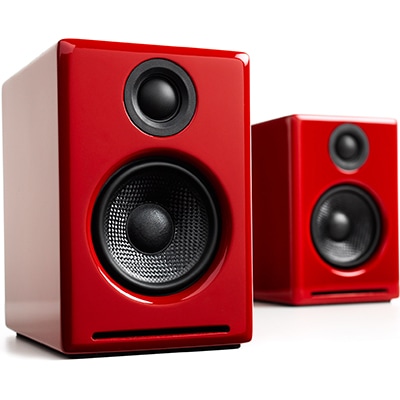
A2+ Speaker System

The award-winning A2+ premium powered speakers bring high-fidelity stereo sound to your desktop and smaller rooms. A2+ has quickly become the new reference standard for multimedia computer speakers.
— / —

Technical Specifications

General specifications

Amplifier type
Dual class AB monolithic

Power output
60W peak power total (15W RMS / 30W peak per channel), AES

Drivers
2.75″ aramid fiber woofers, 3/4” silk dome tweeters

Inputs
3.5mm stereo mini-jack, RCA, USB

Outputs
RCA variable line-out

Input voltages
100-240V 50/60Hz auto-switching

SNR
>95dB (typical A-weighted)

THD+N
<0.05% at all power settings

Crosstalk
-50dB

Freq. response
65Hz-22kHz ±2.0dB

Input impedance
10K ohms unbalanced

Protection
Output current limiting, thermal over-temperature, power on/off transient protection

USB specifications

Connector type
USB type-B

USB device class
type 1.1 or above

Internal D/A converter
TI/Burr Brown PCM2704C

Input bit depth
up to 16 bits native

Input sample rate
up to 48KHz native

Weights and measures

Dimensions (each)
6”(H) x 4”(W) x 5.25”(D)

Weight (LEFT speaker)
1.6Kg/3.55lbs

Weight (RIGHT speaker)
1.4Kg/3.15lbs

Shipping weight
4.6kg/10lbs per pair

Shipping box dims
10.5” (H) x 15” (L) x 7” (W)

Finish options

Satin Black Paint
Hi-Gloss White Paint
Hi-Gloss Red Paint

Environmental requirements

Operating temperature: 32° to 95° F
Non-operating temperature: -4° to 113° F
Relative humidity: 5% to 95% non-condensing

Materials and contruction

6.35mm thick MDF cabinets
3/4″ silk dome tweeters with neodymium magnets
2.75″ aramid fiber woofers with advanced voice coils

Included accessories

Speaker wire (16AWG), 2 meters (~6.5 feet)
Power supply
AC power cord
Mini-jack audio cable, 1.5 meters (~5 feet)
USB cable, 1.5 meters (~5 feet)
Microfiber speaker bags
Microfiber power supply bag
Microfiber cable bag
Setup guide
Product line brochure

Custom built

Audioengine designs and manufactures our own tweeters, woofers, and other critical components. In other words, these are not “box built” speakers with off-the-shelf parts but custom-designed to our specifications. What we do not fabricate directly in our factory we have made to our designs (parts such as transformers, magnets, and wiring harnesses, for example). The cabinets, drivers, bass port designs, amplifiers, and crossovers are all painstakingly tuned together for each Audioengine model. This, in turn, makes for a much more efficient system that requires much less power than passive speakers and a separate integrated amplifier or similar A/V components.

Drivers

Audioengine uses audiophile-quality, ferrofluid-cooled silk dome tweeters with neodymium magnets. Silk tweeters hold up well under high power and the edge-driven design gives very smooth response. The woofers are aramid fiber woven glass composite with rubber surrounds. Aramid fiber is obviously very strong, which means that the woofer retains its shape when being driven at high levels. The speaker materials and construction are robust enough to stand up to some serious thrashing, so speaker grills aren’t needed and they will sound and look great after many years of use.

Power amplifiers

The amplifiers in Audioengine speakers are located in the left speaker and are a conservatively rated analog design. All components are tuned together for each model, which provides a much more efficient system requiring less power than passive speakers and separate amplifiers. Circuit boards for the power and preamp sections are mounted for maximum mechanical shock protection.

Power transformers

Power transformers are a large contributor to the overall audio performance, especially in the low end. Again, no off-the-shelf parts. Audioengine uses gapless core toroidal transformers which have a tighter radiated magnetic field, directly translating to lower noise. They are lighter than standard, lower-cost “EI” transformers and also generate less heat.

Shielding

Both drivers are directly video shielded and allow the user to place the speakers within a few inches of a video monitor. This shielding also offers protection for hard-drive digital music players.

Based on studio monitor designs

Studio monitor speakers are used by producers and engineers in recording and production studios. They are designed with a theoretical flat frequency response which allows the engineer to create a final mix in such a way that the recorded music will sound good on most other speakers. Although Audioengine speakers are not designed to be up-close “nearfield” studio monitors, we do carry over much of the same higher-end technology, components, and design philosophy for Audioengine speakers.

Cabinets

To minimize unwanted resonances and distortion, Audioengine cabinets have thick high-resin MDF walls with extensive internal bracing. Heavy internal sound-damping material is used to reduce unwanted sound reflections inside the cabinet. All cabinet edges are rounded which look great and reduce high-frequency diffraction effects on the front baffles. Each cabinet contains tuned, front-port slots. Both speakers are tuned and tested together and sold in pairs.

Quickstart Guide

A2+ Classic Quick Setup

Quick Setup

Step 1 – Connecting the speaker wire

1. Use your thumb and finger to unscrew the connectors.

2. Insert each speaker wire into the holes on the side of connectors.

3. Retighten the connectors with your fingers.

4. The bare portion of the wire should be secured firmly in each connector.

Repeat the procedure to connect the other end of the speaker wire to the other speaker. Check to make sure none of the speaker wire strands have come in contact with a nearby connector.

As the A2+ speakers have the power amplifiers built inside, do not connect the speaker terminals to the speaker outputs of a stereo receiver.

Step 2 – Connecting the Power Supply

Verify that the volume/power switch on the rear panel of the left

speaker is in the OFF position by rotating it counterclockwise

until it clicks off.

1. Connect the cable from the power supply to the left speaker rear panel.

2. Connect the power cable to the other end of the power supply.

3. Connect the power cable to an AC power outlet.

4. Verify that the LED indicator on the power supply is illuminated.

Use only the power supply provided with the speakers.

Step 3 – Connecting an Audio Source

Using the appropriate audio cable, connect the speaker inputs to your audio source (computer, iPhone, iPad, etc.). One example is shown in the diagram.

Another option for connecting a computer to A2+ is via USB audio. Using the included USB cable, connect as shown in the diagram.

For PC, the A2+ should be recognized automatically.For Mac, under System Preferences/Sound/Output, select “Audioengine 2+”


For the full setup guide, download the attached PDF:
A2_plus Setup Guide


A2+ Setup Video

https://audioengine.mom/wp-content/uploads/2018/03/A2+_How_To.mp4

Troubleshooting

A2+ Classic Troubleshooting Tips

The following troubleshooting tips can help diagnose and correct most concerns with the A2+ Classic. We have attempted to make this list as comprehensive as possible, so some of these may not apply to your issue, but please go through each tip.

If the power indicator on the A2+ external power supply unit is not illuminated, try these tips:

  1. Make sure the AC power cord is connected to the power supply unit and to a working AC power outlet.
  2. Check that the cable at the other end of the power supply is correctly connected to the rear panel of the left speaker.

If the power supply light is on but you are experiencing an audio-related issue, try these tips:

  1. Verify that the volume/power control on the rear panel is not turned all the way down or powered off (we recommend setting the volume to at least the 10 o’clock position).
  2. Check that the volume level of your audio source components or devices is not set to minimum volume or powered off.
  3. Check speaker wire connections from the left (powered) speaker to the right (passive) speaker. Confirm this by removing the speaker wire from on each speaker and reconnecting.  Also check the speaker wire polarity by verifying that the wires are going to same terminals on both speakers.
  4. Check that the cables from your audio sources to the speakers are properly connected. Confirm this by unplugging the audio cables and then reconnecting.
  5. Decrease the volume of the input audio source and increase the volume of the speakers.
  6. Try using different audio input sources and/or devices to see if the problem follows.
  7. Try swapping your left and right speaker via the RCA left and right inputs to see if the issue remains in the same channel or follows the speaker.
  8. If you are using a computer with your A2+, make sure the volume is up on your media players, internet radio, master control, device volume, etc. and the balance control is centered.
  9. If your input source has its own EQ, please make sure the low end is at a moderate level, as having too much bass can cause distortion.
  10. If you are using a wireless adapter, preamp, or external DAC with these speakers, remove them (temporarily) and connect the audio input source directly to the speakers.
  11. Move your speakers to a different location to see if something is causing interference in the current setup.  Something as simple as a wireless internet router, cordless or mobile phone, or halogen lamp near the speakers can cause interference.

A2+ troubleshooting tips – internal USB digital-to-analog converter

Try these tips if your computer is not recognizing the speaker through your computer’s USB input or the sound through USB isn’t functioning correctly.

If you are using a Windows computer, uninstall the USB driver from your computer.  Then disconnect the USB cable to remove the A2+ from your computer and plug it back in to allow the USB driver to re-install automatically.  You can find complete instructions from Microsoft on how to reinstall a plug-and-play device under Windows here.

If you are using a Mac, try a NVRAM/PRAM reset.  This resets the system configurations for some audio and video related items and can many times help clear up problems related to audio. See Apple’s support page for information on how to do this.

FAQ's

Yes, you can.   The A2+ speakers use a switching power supply so it will automatically convert to the different voltage. The power cable is  also detachable which makes it convenient to replace the AC plug with a different type if you don’t want to use an adapter plug.

1. Turn Off and Unplug:

  • Make sure your system is turned off and unplugged.

2. Dust the Surfaces:

  • Use a soft, dry cloth to wipe away dust.
  • For hard-to-reach places, use a soft brush or a can of compressed air.

3. Wipe Down the Exterior:

  • We do not recommend using any solvents
  • If cleaning off stains or build-up is necessary, we recommend doing so with a very small amount of mild cleaning solution applied only to the affected area, followed by quickly wiping the area dry completely. 
  • Any scoured pads or objects like a ‘magic eraser’ too easily run the risk of removing sealers and top coats of the painted finish that can leave a clearly visible change in the uniformity of the paint/finish

4. Clean the Speaker Grills:

  • The speaker grills can be gently cleaned with a vacuum, preferably using a soft bush attachment.
  • A lint roller can also be used.

5. Clean Buttons and Knobs:

  • A dry cloth is recommend for cleaning any knobs, buttons or other surfaces
  • Be careful not to let water get into any gaps.

6. Clean Ports and Connections:

  • Use compressed air to blow out dust from ports and connections.

7. Let Everything Dry:

  • Make sure everything is completely dry before plugging back in and turning on.

8. Regular Cleaning:

  • Dust your system regularly to keep it in good shape.

By following these steps, you can keep your Audioengine system clean and working well.

Audioengine HQ
325 E Lamar St
Sherman, TX 75090

US-Based Phone Support Team: (855) 845-5525

Facebook-f Instagram Pinterest-p Youtube Reddit-alien

Product Information

  • Blog
  • Quickstart Guides
  • Frequently ask Questions
  • Discontinued Products
  • Giveaway
  • Audioengine EU
  • Blog
  • Quickstart Guides
  • Frequently ask Questions
  • Discontinued Products
  • Giveaway
  • Audioengine EU

Sales

  • International Sales and Support
  • Military and Veteran Discounts
  • Become an Affiliate
  • Finance with affirm
  • Order Status
  • Support
  • Warranty Information 
  • Returns and Exchanges
  • Cancel order form
  • Authorized US Dealers
  • Unauthorized Dealers
  • International Sales and Support
  • Military and Veteran Discounts
  • Become an Affiliate
  • Finance with affirm
  • Order Status
  • Support
  • Warranty Information 
  • Returns and Exchanges
  • Cancel order form
  • Authorized US Dealers
  • Unauthorized Dealers

About Us

  • Our Story
  • Meet The Team
  • Tune In
  • Swag Store
  • Customer Reviews
  • Industry Reviews
  • Media Inquiries
  • Non-Profit Request
  • Audioengine in the News
  • Backstage Email Sign Up
  • Our Story
  • Meet The Team
  • Tune In
  • Swag Store
  • Customer Reviews
  • Industry Reviews
  • Media Inquiries
  • Non-Profit Request
  • Audioengine in the News
  • Backstage Email Sign Up

Legal

  • Privacy Policy
  • Terms and Conditions
  • Copyright and Legal Disclaimers
  • Privacy Policy
  • Terms and Conditions
  • Copyright and Legal Disclaimers

© 2026 audioengine    All Rights Reserved.

Email signup

Accessibility

Lorem

Accessibility

Audioengine strives to design and maintain this site to be accessible, following the Web Content Accessibility Guidelines 2.1 Level AA. This includes designing, maintaining, and regularly testing, with the assistance of a third-party digital accessibility consultant, the website for continued accessibility. If you have difficulty with this website because of a disability, or have any related feedback, please e-mail [email protected].

Ok

Select the fields to be shown. Others will be hidden. Drag and drop to rearrange the order.
  • Image
  • SKU
  • Rating
  • Price
  • Stock
  • Availability
  • Add to cart
  • Description
  • Content
  • Weight
  • Dimensions
  • Additional information
Click outside to hide the comparison bar
Compare